Help Center
Updated on 2026-04-14
views
5min read
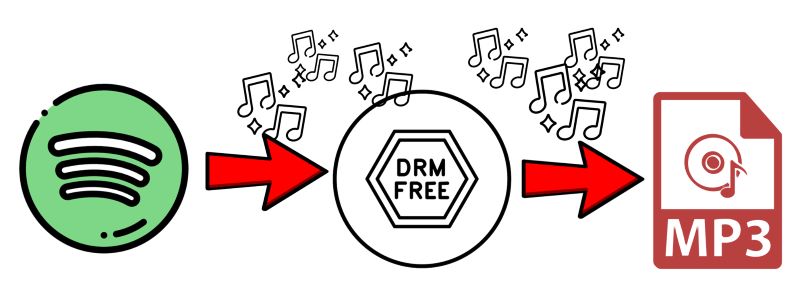
Sometimes, you want Spotify music on your device and outside the app, such as using your favorite song as the phone ringtone. However, Spotify doesn’t make that easy. Its DRM encryption blocks any unauthorized use, locking the music to their ecosystem. So, what’s the solution? Well, specialized tools can remove DRM from Spotify, freeing your tracks, playlists, and audiobooks for offline access in open formats. This way, you can set your favorite Spotify music as alarm or add it into your projects.
In this post, we’ll walk you through six of the best free methods to decrypt Spotify DRM. Whether you’re using a computer, mobile, or prefer a quick online tool, you’ll find step-by-step instructions tailored to your setup.
Part 1. How Does Spotify Use DRM?
Spotify streams its audio in a format called OGG Vorbis, wrapped with layers of digital rights management (DRM) encryption. This is a form of software-based encryption, meaning only authorized Spotify apps, equipped with the necessary decryption keys, can decode and play the content.
Part 2. Overview of 6 Spotify DRM Removal Tools
Here’s a quick overview of the tools we’ll explore for Spotify DRM removal. This fact sheet covers essential details. Additional information will follow later as we dive into each tool step by step.
| Tool Name | Supported Content | DRM-Free Formats | Audio Quality | ID3 Tags | Batch Download Limit |
|---|---|---|---|---|---|
| Eassiy Screen Recorder Ultimate | Any audio stream playing on your device | MP3, AAC, FLAC, and more | Captures original stream quality | Clean output with no watermarks or branding | Automated via built-in timer; no set limit |
| Spowlo | Songs, playlists | MP3 | Up to 256kbps (YouTube source) | Basic tags (derived from YouTube) | No limit. If downloading more than 20 songs, it will get slow and skip songs. |
| Spytify | Songs, playlists | MP3 | Match original streaming quality | Automatic tagging, sourced from Last.fm and Spotify | Manual recording required, no set limit. |
| SpotifyDown (Online) | Songs, playlists | MP3 | Up to 256kbps | Basic tags (title and artist only) and comes with SpotifyDown.com watermark | Process playlists, but download a song at a time. |
| iTunes Purchases | Songs, albums | AAC | 256kbps | Complete metadata | Download individual songs or download all purchased tracks at a time. |
| Music Hunter Bot (Telegram) | Songs, playlists | MP3 | Up to 320kbps | Basic tagging | It can process 400 songs per session, but one-by-one download. |
Part 3. Remove DRM from Spotify for Free via Desktop Software
Eassiy Screen Recorder Ultimate captures any audio stream playing on your device in high quality, saving it in open formats like MP3, AAC, or FLAC — completely free from DRM restrictions. You can install the tool on your Mac or Windows computer and use it immediately. Once saved, the recorded audio files remain DRM-free and fully accessible for offline playback permanently.
Regarding the recording process, Eassiy Screen Recorder Ultimate features a built-in timer and audio format selector, so you can directly configure your output settings and start recording without copying links or navigating between apps. Every recorded file is saved cleanly, with no watermarks or branding added to the filename. Plus, you can preview recordings before saving to ensure quality.
Eassiy Screen Recorder Ultimate
Record any audio stream playing on your device and save it as MP3, AAC, FLAC, and more with system sound capture and permanent offline access.
Key Features
- Record any audio stream in high quality — songs, playlists, podcasts, audiobooks, and more.
- Supports multiple output formats including MP3, AAC, FLAC, and more.
- Built-in timer for hands-free, automated recording sessions with no set limit.
- Preview recordings before saving to ensure quality.
Steps to Use Eassiy Screen Recorder Ultimate to Get DRM-free Audio
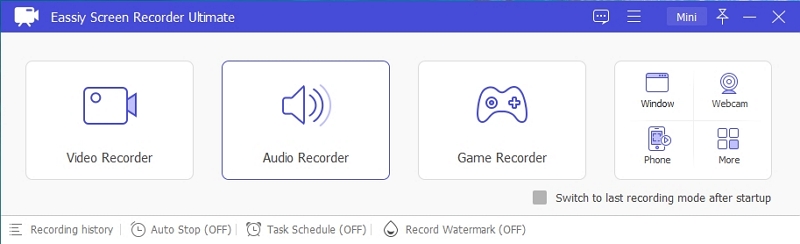
Step 1. Download and install Eassiy Screen Recorder Ultimate on your Windows or Mac computer. Once launched, select the Audio Recorder feature from the main interface.
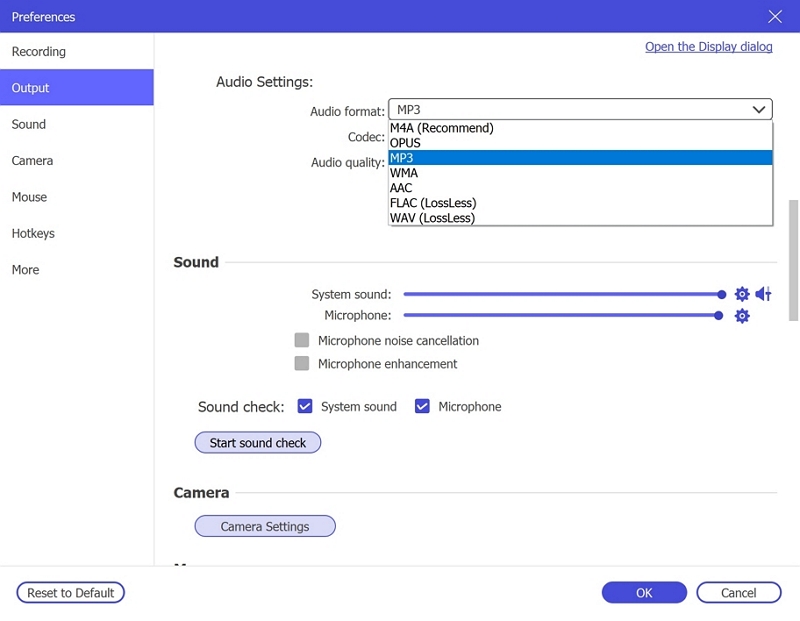
Step 2. Configure your audio recording settings. Enable System Sound to capture the live stream audio. Optionally enable the microphone if needed. Click Settings → Preferences → Output to select your desired audio format (e.g., MP3, AAC, FLAC) and set the quality to High. Click OK to save.
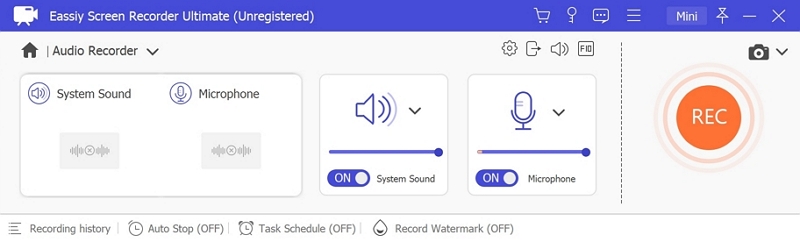
Step 3. Play the audio stream you wish to record, then click REC to begin recording. Use the toolbar to adjust volume, pause, or stop at any time. To automate the process, click the clock icon to set a recording duration in advance.
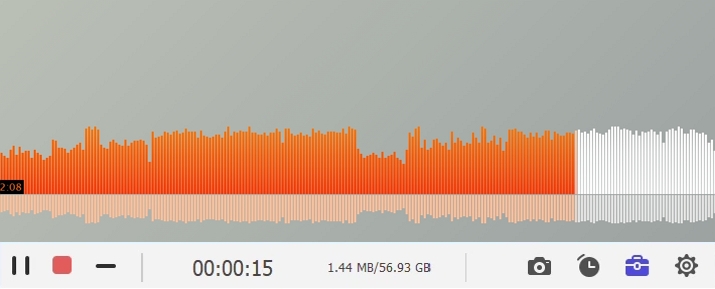
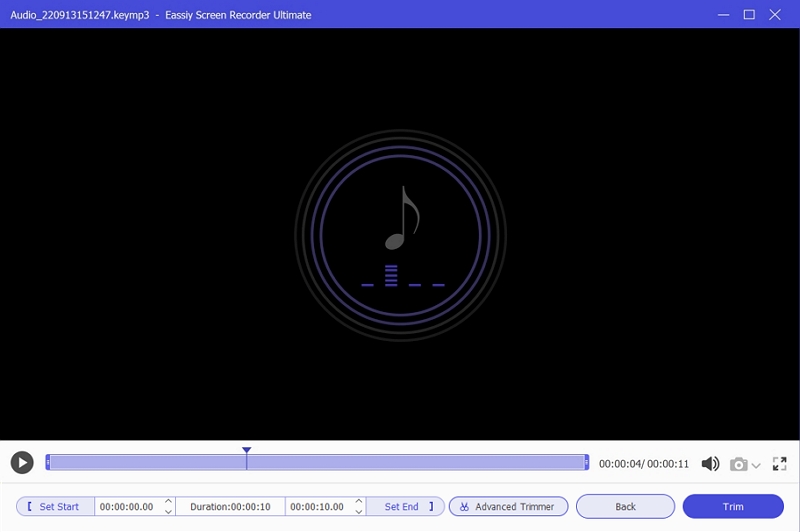
Step 4. When finished, click Stop and preview your recording. Save it in your preferred DRM-free format to your device for offline listening anytime.
Part 4. Disable Spotify DRM for Free with GitHub Utility
There are several open-source tools on GitHub for removing DRM from Spotify. Many of these tools, while powerful, often require some level of customization or technical setup.
One that stands out for its simplicity is Spowlo. You can install it as an app on your Android device. However, there’s a key distinction: Spowlo sources the audio from YouTube, as the tracks are already DRM-free, rather than directly from Spotify. That’s why you’ve to compromise on output audio quality and settle for 256 kbps.
Here’s how to install and use Spowlo:
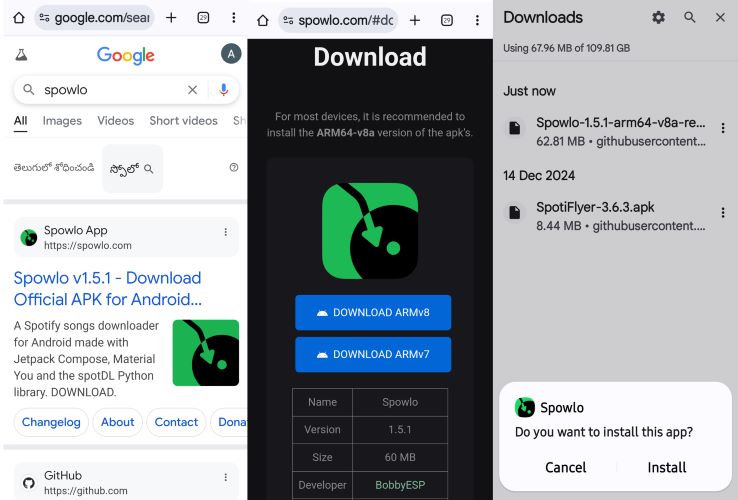
Step 1. Search for Spowlo.com in your Android browser. On the website’s download page, you’ll find two versions: ARM v8 and ARM v7.
Step 2. Select Download ARMv8, as it’s generally recommended for recent Android devices. And install the APK file on your device.
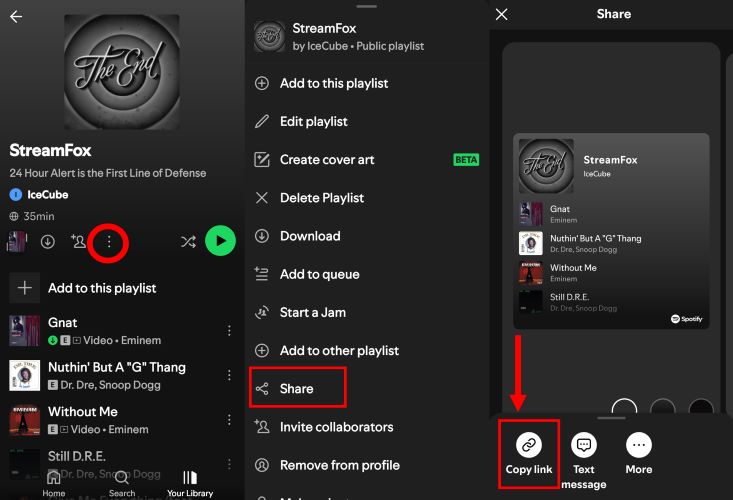
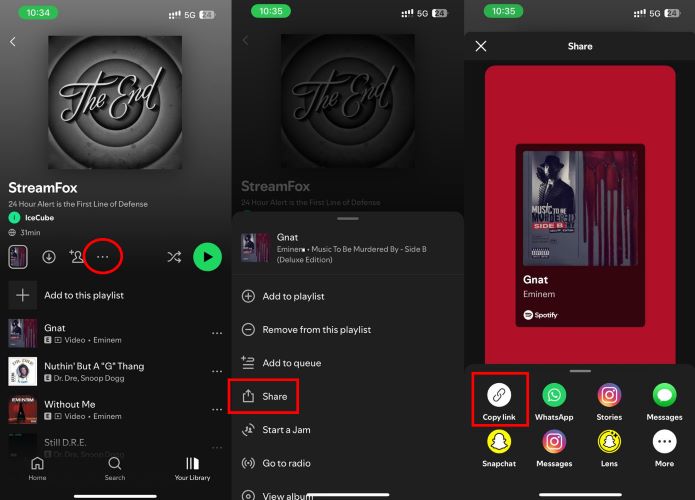
Step 3. Once installed, open Spotify. Find the playlist or song you want to download, then tap the three-dot menu near the playlist controls.
Step 4. From the menu, select Share and then tap Copy Link.
Step 5. Open the Spowlo app. On the main screen, you’ll see a box labeled Spotify URL query. Paste the copied link into it.
Step 6. Tap the Download button. This will bring up a small panel from the bottom, which allows you to adjust basic settings such as file format and whether to include lyrics. Configure these as needed.
Step 7. Once everything is set, tap See Playlist and then hit the final Download button on the next page.
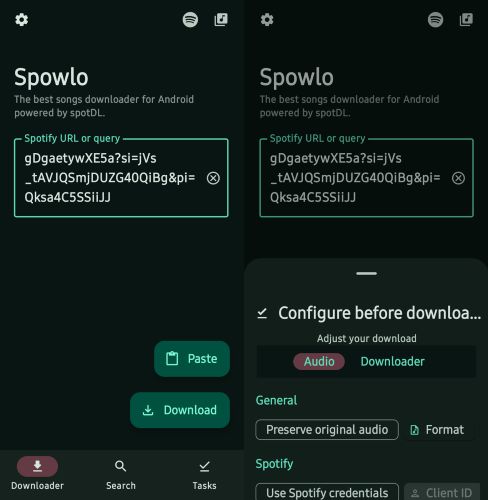
Step 8. Switch to the Tasks tab. The app will run some checks before starting each download, so wait till the tracks are processed.
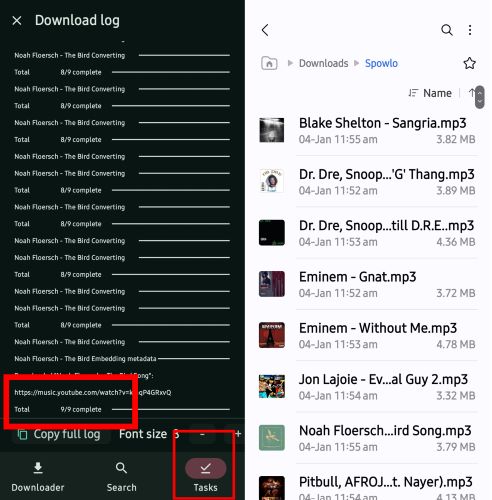
Step 9. After downloading is complete, navigate to your Android’s Downloads folder. Inside, you’ll find a dedicated Spowlo folder containing all the DRM-free tracks.
Part 5. Decrypt Spotify DRM for Free with Recording App
Another route to get DRM-free Spotify music is to simply record the Spotify audio played on your computer. Plenty of recording tools can do this, but most of them will leave you with untagged audio files. You’ll have to manually name each track, add the artists, and so on. Spytify takes that burden off. Built for Spotify alone, it captures audio with precision and tags each file automatically. However, for now, it’s Windows-only.
Here are the steps to use Spytify:
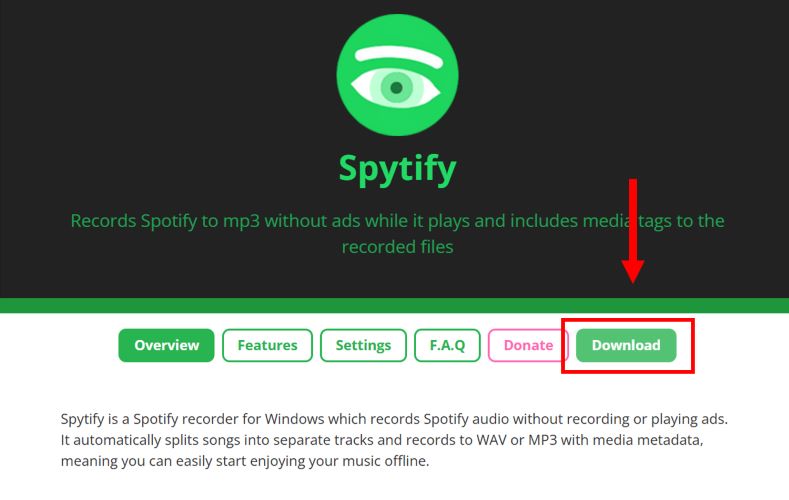
Step 1. Download Spytify from its official page.
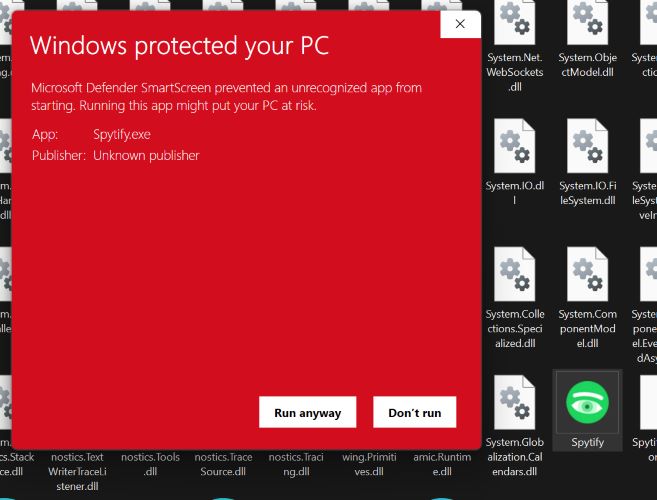
Step 2. Run the installer. Windows Defender might display a warning. Ignore it by selecting More Info, then Run Anyway.
Step 3. Open Spytify. In Settings, go to Audio Device and select Cable Input (VB-Audio Virtual Cable). This will allow you to reroute the Spotify audio internally.
Note: Make sure VB-Audio is installed on your system.
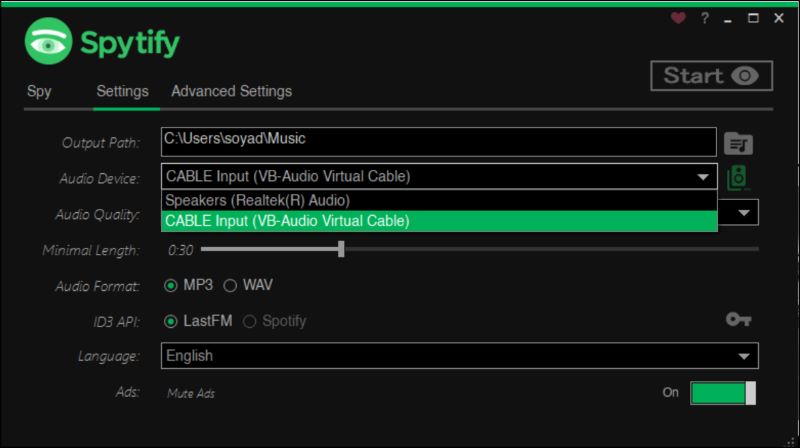
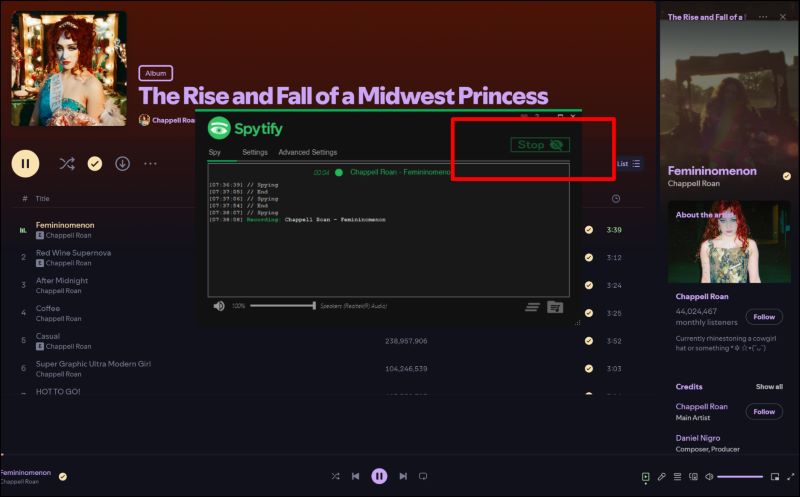
Step 4. Click the Start button in Spytify and then start playing a song on Spotify.
Step 5. Click Stop and Spytify will stop automatically and save the file, complete with proper tags.
Part 6. Remove DRM from Spotify for Free Using Online Tool
Of course, everyone has heard of online Spotify downloaders. The good thing about the online downloaders is you don’t need installations, apps, or any advanced setup. Just copy the desired playlist link, paste it into a browser tool, and download the song. However, note that these web tools handle tracks individually. The output audio quality of the DRM-free tracks will be decent, although not as good as the original quality. Still, for grabbing a playlist or a few songs fast, they do the job well enough.
Follow these steps to remove DRM from Spotify using online tools like SpotifyDown:
Step 1. First, copy the Spotify link for the playlist or song you want.
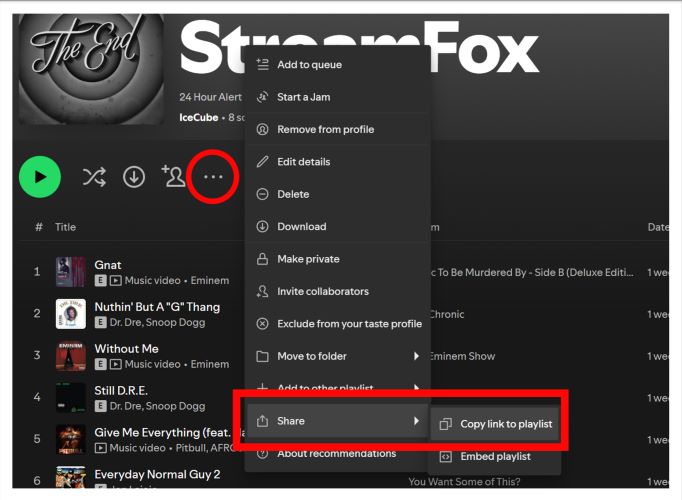
Step 2. Visit spotifydown.com. The input box is right on the main page. Paste the link there.
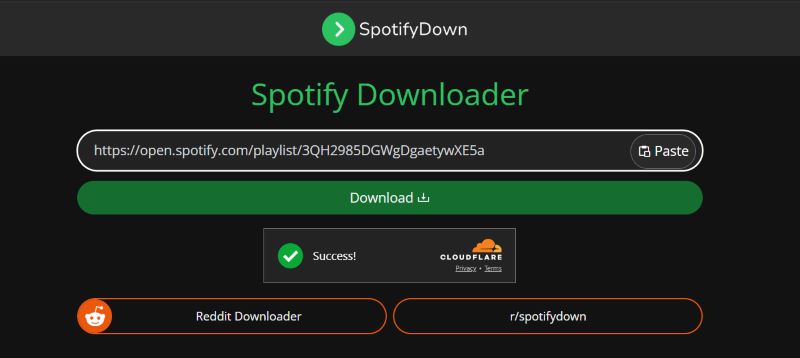
Step 3. Click Download. After a brief processing time, the tool lists all songs in the playlist. Each track appears with its own Download button.
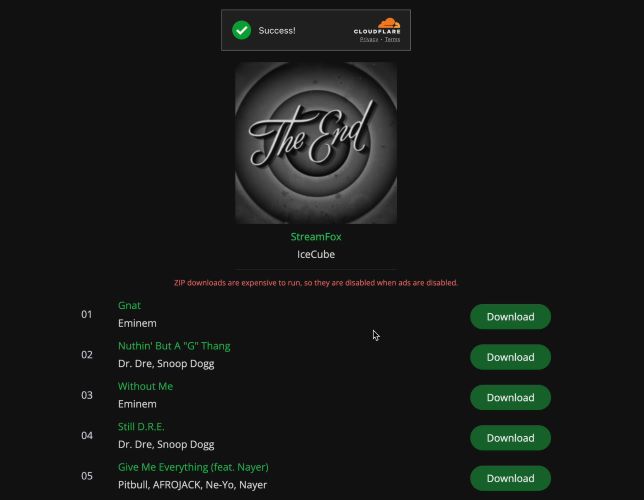
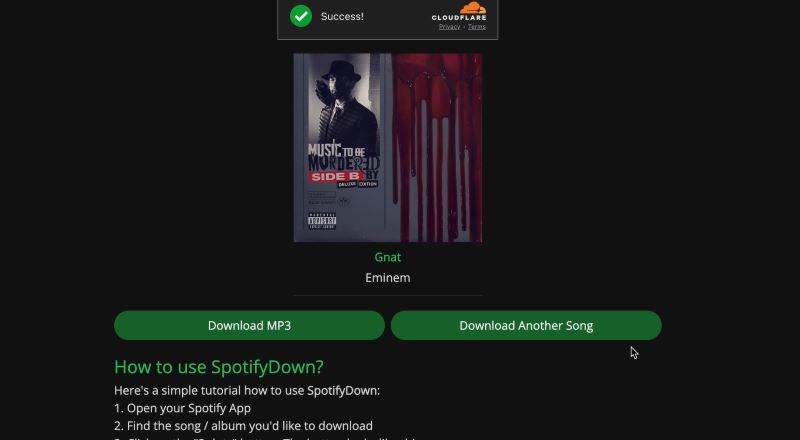
Step 4. When a track is ready, a final Download MP3 button shows up. Click the shown button and the MP3 file will save to your default download folder.
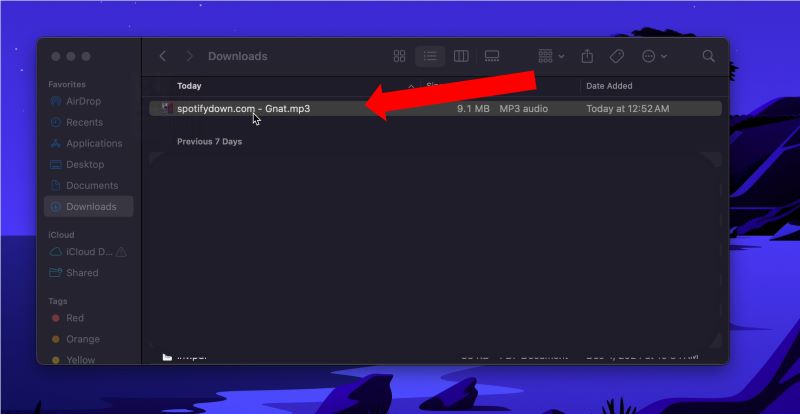
Step 5. Each track that you download will come tagged with spotifydown.com watermark. You’ll need to remove these manually afterward.
Part 7. Remove DRM from Spotify for Free by Buying Songs
Buying songs outright is the most straightforward way to get DRM-free songs if you want to avoid Spotify downloaders. This way also allows you to support the artists. Popular online stores like iTunes and Amazon offer the option to purchase songs easily. Regardless of the platform, purchased songs don’t come with restrictive DRM tags and you’ll have full control over where and how you store them. The main downside of this way is the cost. Albums and individual tracks all have their own pricing structure. Over time, these expenses add up.
Below is an example of how to purchase tracks using iTunes:
Step 1. Download the iTunes Store app on your device.
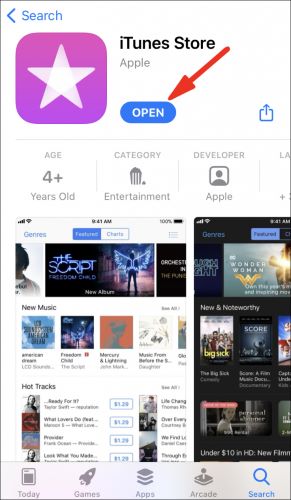
Step 2. Open the app. Tap the Music tab at the bottom. Then, use the search bar to find the song or album you want to purchase. Each listing will display a price next to it.
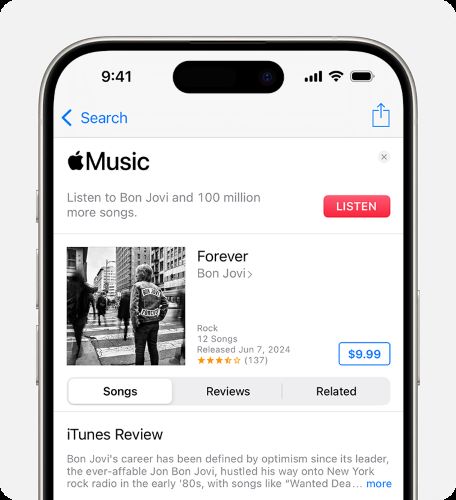
Step 3. Tap the price. Log in with your Apple ID and proceed with the payment.
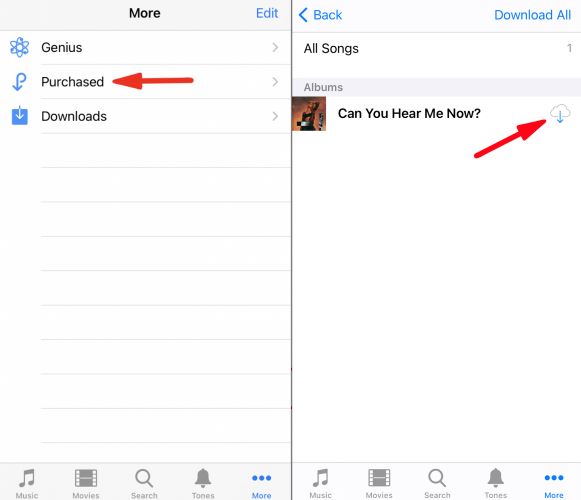
Step 4. After purchasing, tap More at the bottom, then select Purchased > Music.
Step 5. Locate the newly bought track or album. Tap the cloud icon next to it to download it for offline listening.
Part 8. Remove DRM from Spotify for Free Through Mobile App
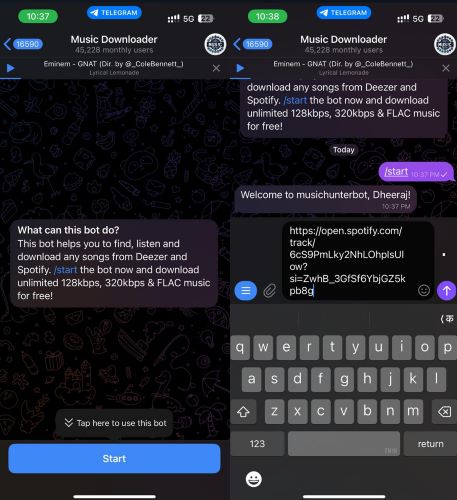
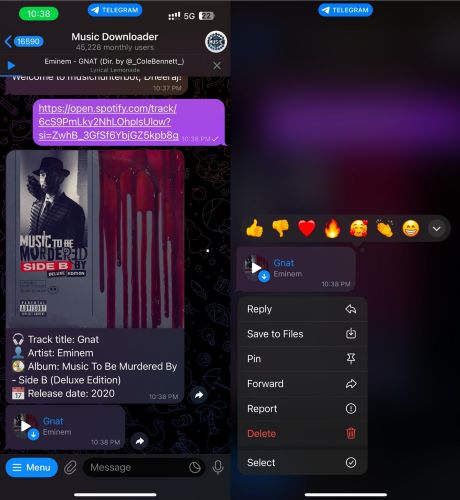
You can use bots on Telegram to download Spotify songs in open formats on mobile devices. All you have to do is install the Telegram Messenger app. Telegram bots function similarly to online tools: paste a Spotify playlist link, and they’ll handle the conversion. An option to consider is @MusicsHunterBot. Here’s how you can get started:
Step 1. Copy the link of the Spotify playlist you wish to download.
Step 2. Open Telegram on your Android or iOS device. Use the global search feature to look for @MusicsHunterBot.
Step 3. Select the bot and tap Start to activate it.
Step 4. Paste the playlist link in the chat and send it to the bot.
Step 5. Wait for the bot to process the link. It will display each song individually with a Download button beside it. Simply, tap the Download icon and you can save them directly to your device.
Conclusion
So, that's it. The best free methods to get streaming audio in open, DRM-free formats. We've covered everything, from mobile apps to desktop tools, so that there is compatibility across all devices. For casual listeners who need just a song or two, options like Telegram bots or online tools work well enough.
However, if you're a dedicated music collector concerned about maintaining top-notch audio fidelity, Eassiy Screen Recorder Ultimate is your ideal solution. It's designed to capture any audio stream playing on your device in high quality, delivering DRM-free recordings as local files — permanently accessible, with no expiry dates or platform restrictions.