Help Center
Updated on 2026-04-14
views
5min read
It's possible for you to download Spotify music to MP3 on your Android phone or tablet if you follow the right steps. To help you find a workable solution fast, we have illustrated 3 ways for you to save Spotify music as MP3 directly on your phone, though the sound quality can't be guaranteed. In case you want high-quality audio, we also share with you a way to record songs to MP3 securely from your screen. Let's dive into the details.
How to Download Spotify Music to MP3 Directly on Android
If you’re looking for a way to download Spotify music to MP3 directly from your Android phone, there are 3 methods you can use. Read on to find out about them below.
Method 1: Use SpotiFlyer
The first method we’d recommend is using the popular SpotiFlyer music downloader APK. SpotiFlyer allows users to easily download music from their favorite music streaming platforms, including Spotify, YouTube Music, and others on Android. The music download will be in MP3 with sound quality ranging from 128kbps to 320kbps.
Check out the steps to use SpotiFlyer to download Spotify music to MP3 on Android below:
Step 1: Open “SpotiFlyer website” and download the latest version of the Android APK.
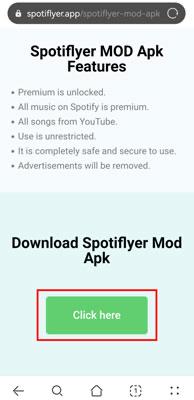
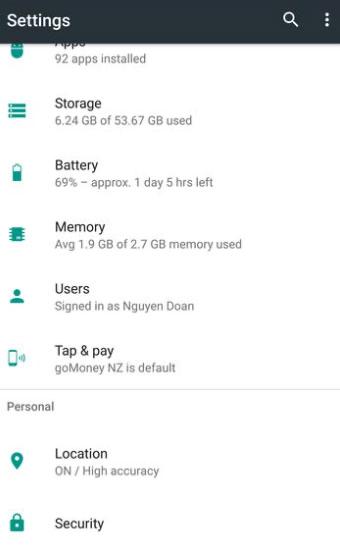
Step 2: After you complete the download, head to your phone’s “Settings” and navigate to “Security”.
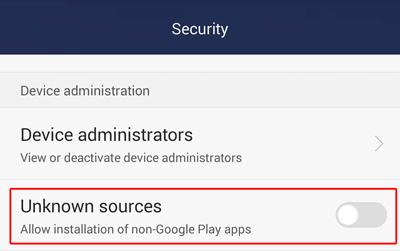
Step 3: Turn on the toggle next to “Unknown Sources” to allow installation of apps from unknown websites.
Step 4: Now, install the SpotiFlyer Android APK on your phone.
Step 5: Open “Spotify” and find the “Music Track” you want to download to MP3.
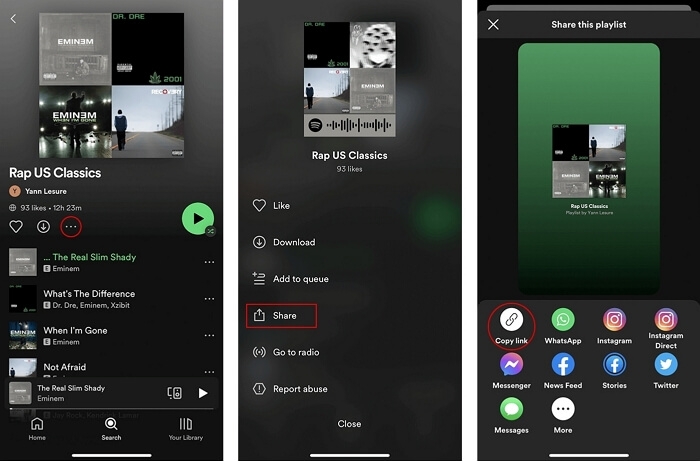
Tap on the “three-dots icon” next to the song and select “Copy Link”.
Step 6: Launch “SpotiFlyer” and paste the copied link into the box that says“Paste Link Here…”. Then, tap on “Search”.
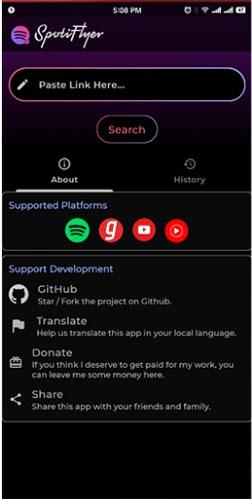
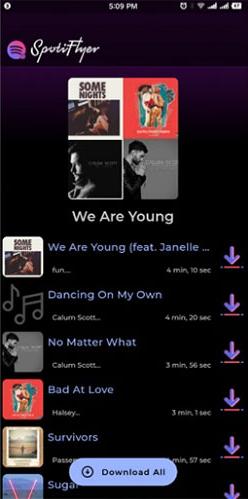
Step 7: Finally, hit the “Download” button to save the Spotify music as MP3.
Pros
- Convert Spotify music to MP3 100% free without ads.
- Straightforward user interface.
- Converts music without compromising its original ID3 tags.
Cons
- Some users reports that SpotiFlyer only downloads from YouTube and it often only gives them the audio of the music video but not the proper song.
- Sometimes, the software even downloads the wrong song in the first place.
- The bitrate is quite low and sometimes the MP3 files won't even play at all.
Method 2: Use Fildo
Fildo is another reliable music streaming and downloading APK that you can use to download Spotify music to MP3 on Android. This application is developed to enable music lovers to download their favorite music from various music streaming platforms, including Spotify without any restrictions. All you need is to import your Spotify account on the app and you’ll be able to download wanted Spotify music within a few taps.
Here are the steps to use Fildo to download Spotify music to MP3 on Android:
Step 1: Visit “Fildo official website” and install the application on your Android phone.
Step 2: Start the “Fildo Application”, tap on “More”, and select “Import Spotify”.
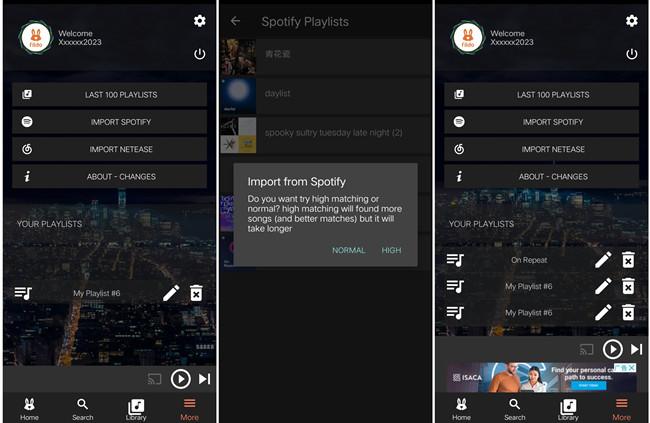
Step 3: Sign in to your Spotify account. Once you do this, Fildo will load your Spotify playlist into its library.
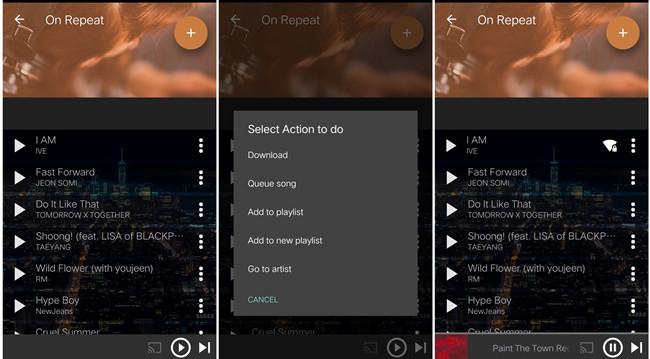
Step 4: Now, find the Spotify song you want to download to MP3 and tap the 3-dot icon next to it. Then, choose “Download”.
Pros
- Lightweight app.
- Boast a vast collection of music tracks from different sources.
- Excellent search feature.
Cons
- It cannot download specific music in MP3 format.
- May fail to load Spotify music.
- Slow download speed.
Method 3. Through spotifymate.com
In addition to Android APK, online Spotify to MP3 downloaders like SpotifyMate are also useful tools for you to download Spotify music on Android. They are easy to use. Simply copy and paste the song link into an online tool and click the download button to save it locally. Next, we will show you the steps of using SpotifyMate.
Step 1: Copy the sharing link of a target song on the Spotify app.
Step 2: Open a browser on your Android phone and input spotifymate.com.
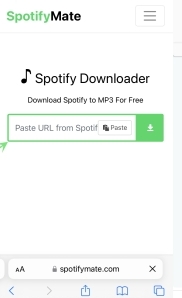
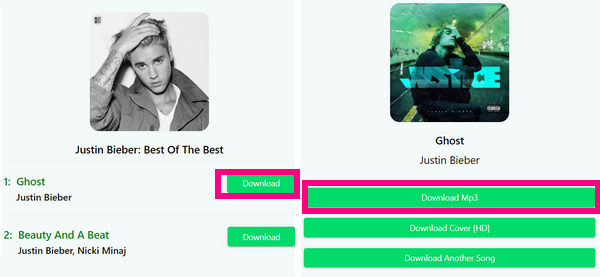
Step 3: Paste the copied link into the site and hit Download.
Step 4: Click Download MP3 to begin downloading the song.
Pros:
- The steps are easy to follow.
- Download Spotify music to MP3 for free.
- No app installation is required.
Cons:
- Ads will be popped out during usage.
- The sound quality is low, generally 128kbps.
- Don't support downloading an entire playlist at once.
Record High-Quality Audio as MP3 for Android
Although the ways above enable you to download music as MP3 on your Android without a computer, the sound quality of the music downloads is often low, commonly 128kbps. If you are seeking a way to get audio as MP3 directly with original high quality for a better listening experience on your Android, don't hesitate to try a reliable desktop screen recorder like Eassiy Screen Recorder Ultimate.
Eassiy Screen Recorder Ultimate is an excellent tool for computers, giving you the flexibility to record high-quality audio and transfer the recorded files to another device like your Android. It captures the exact system sound playing on your computer directly, meaning the audio quality is guaranteed. Once recorded, you can save the audio securely as MP3 and easily move it to your phone.
Key Features
- Record any audio playing on your computer to MP3, AAC, FLAC, and other formats losslessly.
- Deliver audio output with original, high-quality sound.
- Built-in timer to automatically start or stop recording without manual operation.
- Excellent compatibility with both Mac and Windows computers.
Steps to Record Audio to MP3 with Eassiy Screen Recorder Ultimate
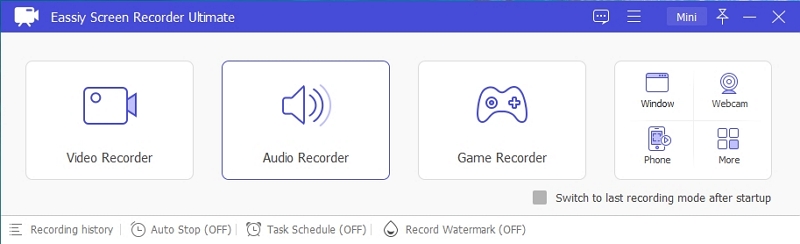
Step 1: Download and install Eassiy Screen Recorder Ultimate on your computer and run the program. Then, select Audio Recorder from the main interface.
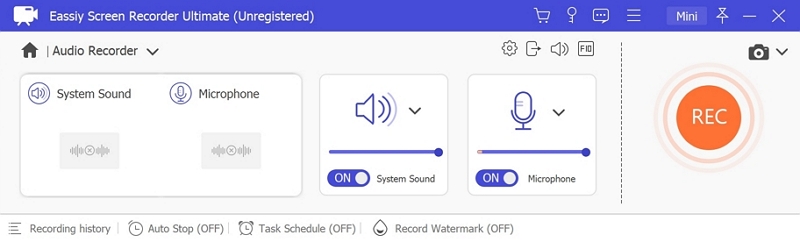
Step 2: Configure your recording settings. Turn on System Sound to capture the audio playing from your device. You can adjust the volume slider as needed.
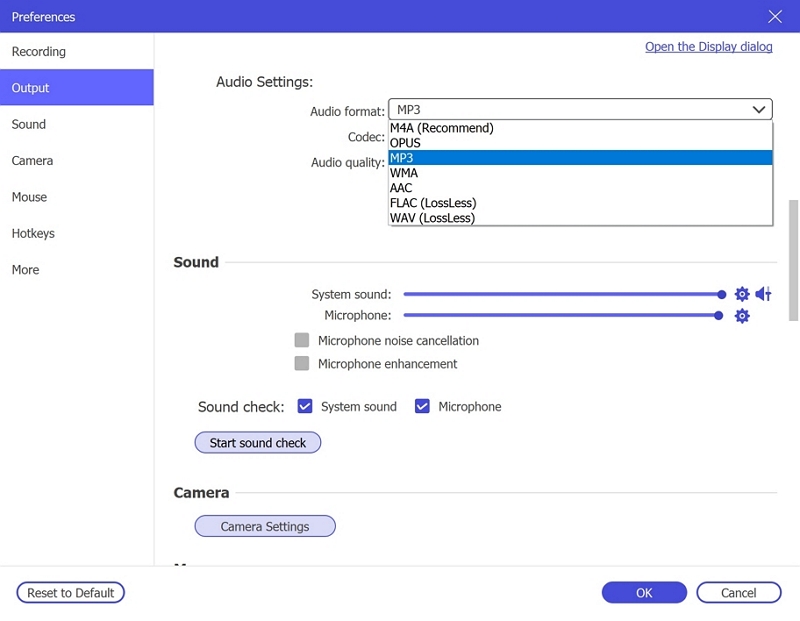
Step 3: Go to the output settings by clicking Settings → Preferences → Output, and select MP3 as the preferred audio format. Ensure the audio quality is set to High.
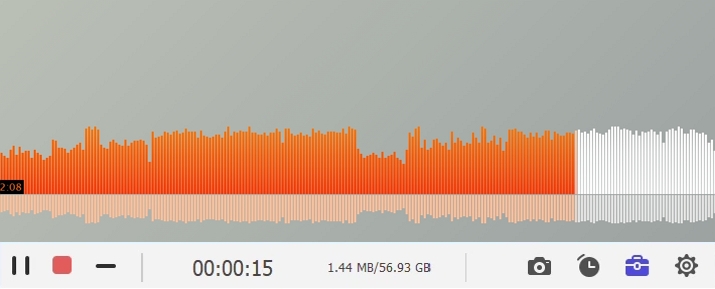
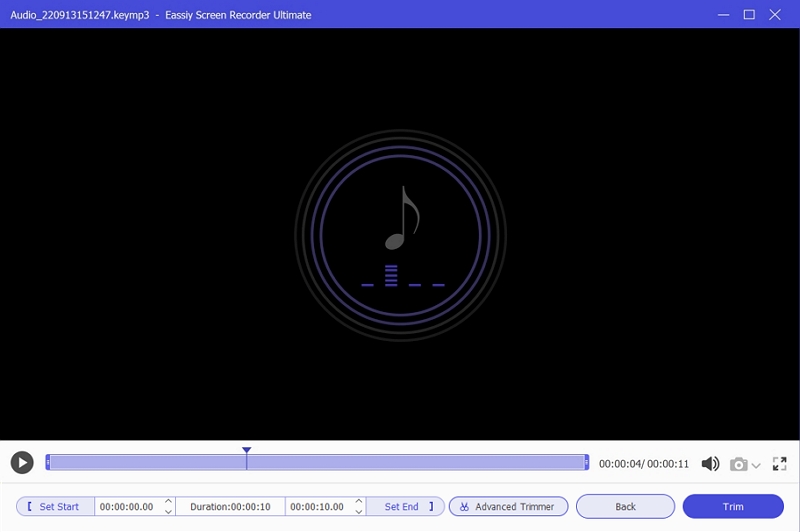
Step 4: Play the audio you want to record, and click the REC button to start capturing. When the audio finishes, click the Stop button to save the MP3 file to your computer.
Transfer the recorded MP3 audio to Android:
Step 1: Once you completely record the audio to MP3, open the “Files Explorer” on your computer and connect your Android device.
Step 2: Once the connection is established between your phone and the computer, you should see your Android phone icon at the left-hand side of the “File Explorer” window as shown in the image below.
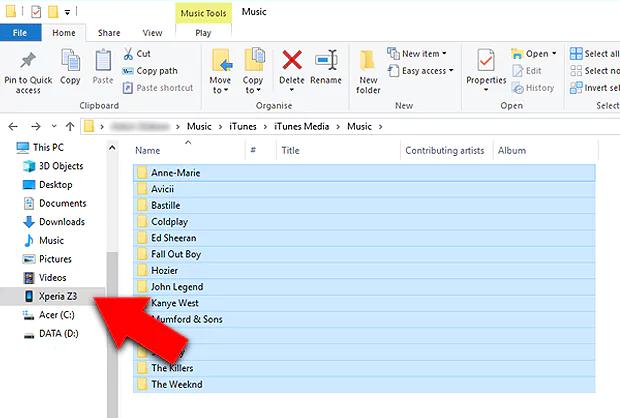
Step 3: Locate the recorded MP3 file you saved on your computer, then drag and drop the audio file onto your “phone icon” to complete the transfer.
How to Download Individual Songs from Spotify App on Android
To download single songs on Android directly from the Spotify app, you need to be a premium user. So, if you have a Spotify premium account, follow these steps to download music on the platform so that you can listen to Spotify offline:
Step 1: Open “Spotify App” on your Android phone and sign in to your premium account.
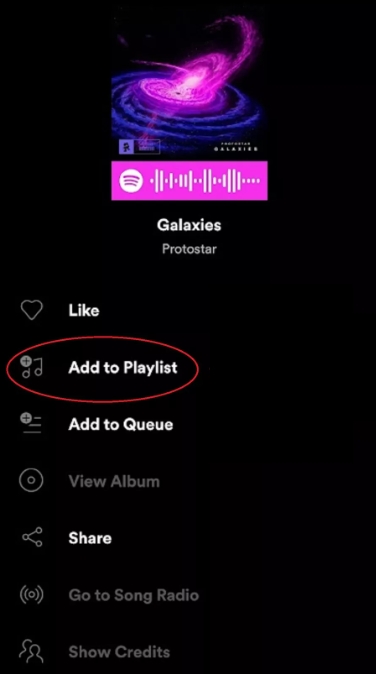
Step 2: Find the wanted song and tap the 3-dot icon next to it. Then, select "Add to playlist" and choose a destination playlist.
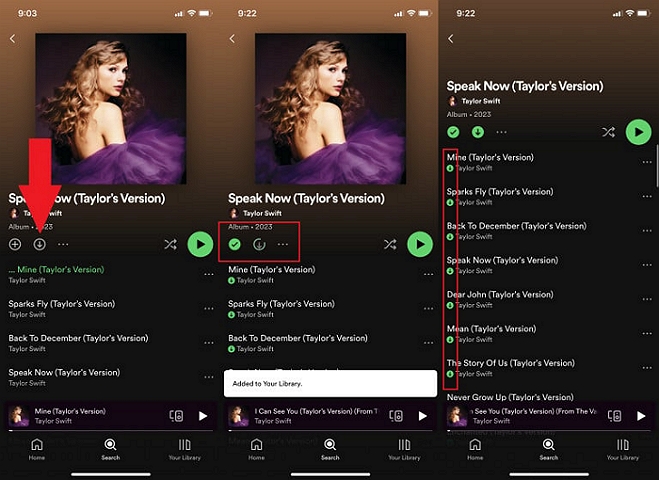
Step 3: Tap the “Download” icon on the playlist screen to download it. Once the download is complete, you should see a green checkmark right in front of each track.
How to Record Single Songs to Android Local Storage
As mentioned before, you can use Eassiy Screen Recorder Ultimate to record audio as MP3 in original and high-quality and then transfer them to your Android device. This way, the recorded files are on your device's local storage securely. Apart from the excellent audio quality, the ability to record individual songs precisely is another reason to recommend this screen recorder. With it, you can easily save a single audio track with a simple click of the record button.
Conclusion
Getting your favorite music to MP3 on Android can be very confusing without the proper guide. However, with the tools introduced on this page, you can easily get the job done without breaking any law.
If you’re not looking to get high-quality audio directly, you can use either SpotiFlyer or Fildo to download music to MP3 on your phone. But for recording songs as MP3 securely with high quality, we recommend a reliable screen recorder like Eassiy Screen Recorder Ultimate for a wonderful listening experience without sacrificing quality.