Help Center

Updated on 2026-04-14
views
5min read
There are various Chrome extensions for you to perform some tasks easily in your browsers, from improving work efficiency to enhancing daily life. You may wonder if there is a Spotify downloader Chrome extension for easy music download. The answer is yes, but only a few of them work effectively on downloading Spotify music. Next, we will share with you 3 tested and worked Spotify downloader Chrome extensions, along with step-by-step guides to use them on your iPhone or Android. In case you want alternatives to Spotify Downloader Chrome extensions, we also introduce 4 tools to download Spotify to MP3 on different devices.
3 Best Spotify Downloader Chrome Extensions
Here are the top 3 free Spotify Downloader Chrome extension to try out in 2024:
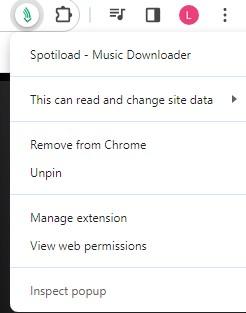
Spotiload (Spotify VK Downloader)
Spotiload Music Downloader (formerly Spotify VK Downloader) is a useful Spotify Chrome extension that supports effortless download of songs and videos from popular streaming platforms such as YouTube, Facebook and more. You can also use it to export Spotify songs on your computer.
Pros
- Get your favorite tracks and playlist from Spotify, SoundCloud, Deezer and other social streaming services.
- Save your Spotify songs directly to your computer.
Cons
- This plug-in is marked illegal in some countries.
- You only have MP3 format as the supported output format.
- Has a download cap of 10 songs per time.
Steps to Use Spotiload
- Install Spotiload extension on your Chrome browser.
- Go to vk.co, sign up for a profile if you don’t have one and log in.
- Run Spotify web player on Chrome, and sign in your profile.
- Once done, go to Your Library panel, which is situated on the left hand side of your screen.
- Next, select a song or playlist to download and go back to the Spotiload webpage.
- Now, click on Add Track and Spotiload will initiate the download immediately.
Spotify & Deezer Music Downloader
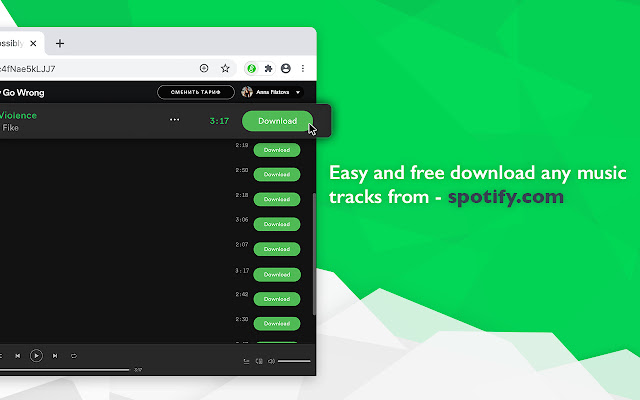
As the name implies, Spotify & Deezer Music Downloader is a Chrome extensions dedicated to extracting/downloading songs from both Spotify and Deezer. It’s also a reliable option for getting your desired songs from SoundCloud.
Pros
- It enables you to download Spotify or Deezer full playlists without stress.
- Save downloaded audio in MP3 format.
- No premium subscription is required to use this plugin.
Cons
- Can’t be directly installed from the Chrome web store.
- Inconvenient to download a batch of Spotify songs.
Steps to Use Spotify & Deezer Music Downloader
- Launch Chrome browser on your computer and search for Spotify & Deezer Music Downloader in Chrome Web Store.
- Click Add to Chrome to download the extension.
- After that, launch the extension and Spotify web player will automatically load.
- Fill in your Spotify details in the space given and search for any song you wish to download.
- Hit the Download icon next to the song you want to download, and the extension will initiate the process immediately.
Skyload
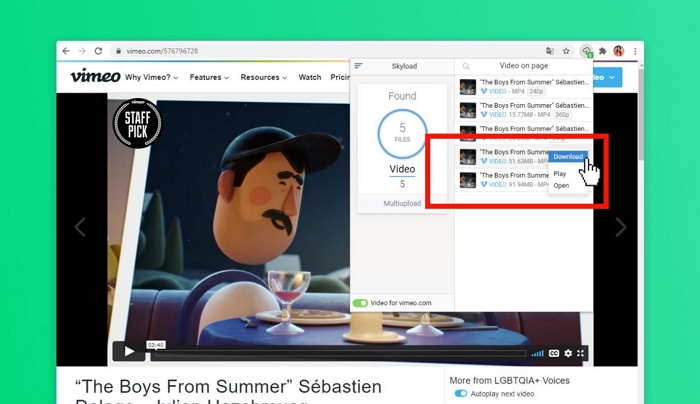
Here is another powerful web browser plug-in you can count on to help you download your Spotify songs to your computer local drive. Not only that, Skyload can also be used for exporting video content on other social services including YouTube, Facebook and many others. It’s very easy to use but you must be ready to deal with ads on the free version. You have to subscribe to premium to avoid ads.
Pros
- Skyload downloads from popular music and video streaming services including Spotify.
- It’s completely free to download Spotify songs.
Cons
- The plug-in often crashes.
- Too many ads to deal with when you use the free version of the extension.
Steps to Use Skyload
- Download and install the Chrome extension version of Skyload on your computer.
- Access the Spotify page of the song you want. Then click the Skyload icon in the extension bar.
- Choose the Spotify track you want to download and click three-dot icon next to it. Then choose Download to save Spotify tracks to local files.
How to Use Spotify Downloader Chrome Extensions on Android
As we can't directly install extensions on Chrome Android, we need to install a third-party browser to use the Spotify Downloader Chrome Extension. Here Kiwi Browser is recommended due to its strong compatibility with different extensions from Chrome Web Store. Besides, it can be downloaded via Play Store.
Step 1: Install Kiwi Browser on your Android device. Then run the browser and go to Chrome Web Store.
Step 2: Search for one of the Spotify downloader Chrome extensions recommended above and tap Add to Chrome > OK to install it on your Kiwi browser.
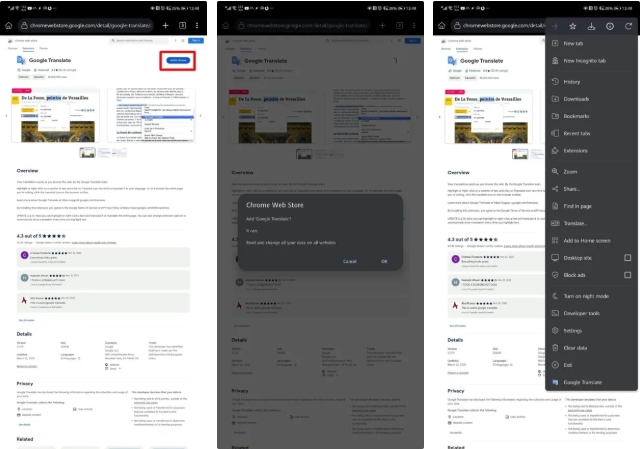
Step 3: Follow the steps for downloading Spotify music using the extension you selected above.
How to Use Spotify Downloader Chrome Extensions on iOS
To use Chrome extensions on iPhone, you also need to install an additional browser. Orion Browser is worth trying. It is compatible with popular Chrome extensions. You can download it and see if you can use the Spotify downloader Chrome extensions introduced above.
Step 1: Install Orion browser on your iOS device via App Store.
Step 2: Run Orion and tap the three-dot icon at the bottom right corner. Next, tap Settings.
Step 3: Locate the Extensions section and toggle Chrome Extensions on.
Step 4: Tap the menu icon again and select Extensions.
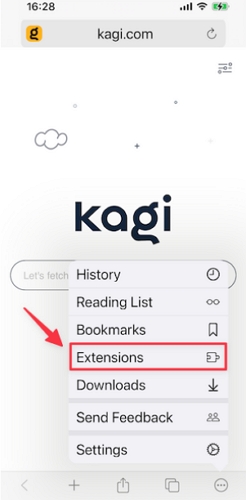
Step 5: Hit the "+" icon to install the wanted Spotify downloader Chrome extension from Chrome Web Store.
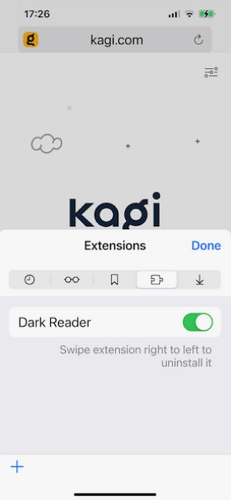
Step 6: Download music from Spotify via the corresponding steps introduced in the part above.
Desktop Alternative to Spotify Downloader Chrome Extensions
If the Spotify Downloader Chrome extensions above fail to work or you want a reliable desktop solution, here is a perfect alternative that you can use, which is a powerful desktop screen recorder.
Whether you use a Windows PC or macOS, Eassiy Screen Recorder Ultimate is the best replacement for the browser extensions introduced above. As a top-quality recording tool, Eassiy Screen Recorder Ultimate captures any audio stream playing on your device in high quality, saving it in open formats like MP3, AAC, or FLAC. Once saved, the recorded audio files remain fully accessible for offline playback permanently.
Regarding the recording process, this screen recorder features a built-in timer and audio format selector, so you can directly configure your output settings and start recording without copying links or navigating between apps. Every recorded file is saved cleanly, with no watermarks or branding added to the filename. Plus, you can preview recordings before saving to ensure quality.
Eassiy Screen Recorder Ultimate
Record any audio stream playing on your device and save it as MP3, AAC, FLAC, and more with system sound capture and permanent offline access.
Key Features
- Record any audio stream in high quality — songs, playlists, podcasts, audiobooks, and more.
- Supports multiple output formats including MP3, AAC, FLAC, and more.
- Built-in timer for hands-free, automated recording sessions with no set limit.
- Preview recordings before saving to ensure quality.
Steps to Use Eassiy Screen Recorder Ultimate to Record Audio
Step 1. Download and install Eassiy Screen Recorder Ultimate on your Windows or Mac computer. Once launched, select the Audio Recorder feature from the main interface.
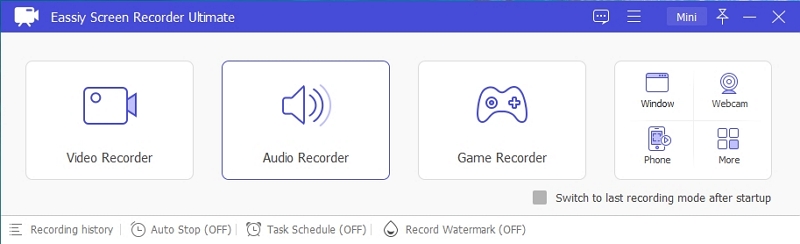
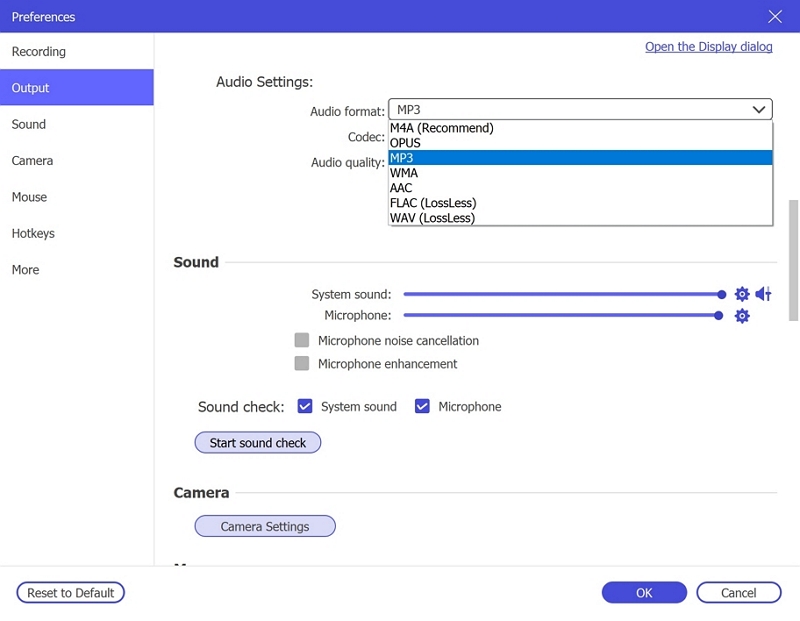
Step 2. Configure your audio recording settings. Enable System Sound to capture the live stream audio. Optionally enable the microphone if needed. Click Settings → Preferences → Output to select your desired audio format (e.g., MP3, AAC, FLAC) and set the quality to High. Click OK to save.
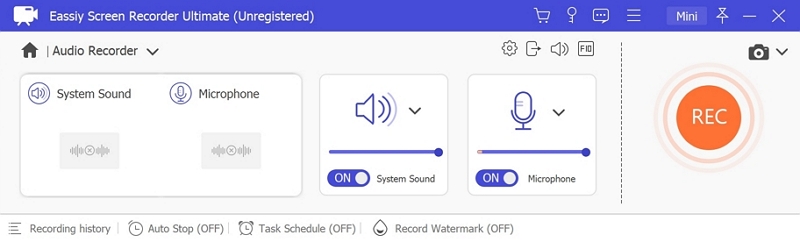
Step 3. Play the audio stream you wish to record, then click REC to begin recording. Use the toolbar to adjust volume, pause, or stop at any time. To automate the process, click the clock icon to set a recording duration in advance.

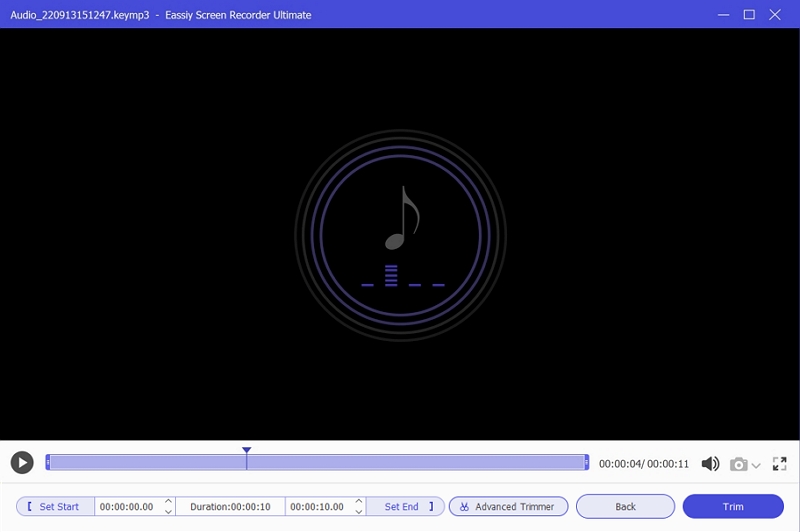
Step 4. When finished, click Stop and preview your recording. Save it in your preferred format to your device for offline listening anytime.
Pros
- Retain the high quality of your audio after recording and saving to your desired format.
- Record any audio effortlessly without a premium subscription to streaming services.
- Support capturing all types of audio including podcasts, songs, playlists, audiobooks, and more.
Cons
- Available only for Windows/macOS.
- Records audio in real-time (1X speed).
Online Alternative to Spotify Downloader Chrome Extensions
In addition to Spotify downloader Chrome extensions, here is another online tool enabling you to download Spotify music with your Chrome browser, which is an online Spotify music downloader like SpotifyMate. This type of tool is easy to use and just requires the link of your favorite song for music download, though you may bothered with the ads when downloading music. Next, we will show you how to download Spotify music with spotifymate.com.
Step 1: Access spotifymate.com on Chrome or other browsers you like.
Step 2: Go to the Spotify web player with another tab on your browser and sign in it.
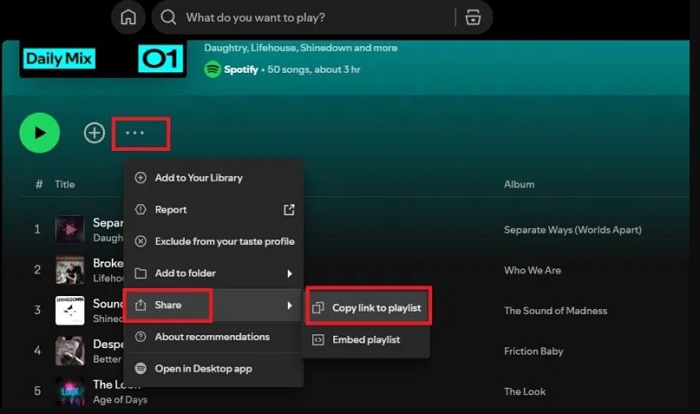
Step 3: Locate the Spotify song you want to download and copy its link.
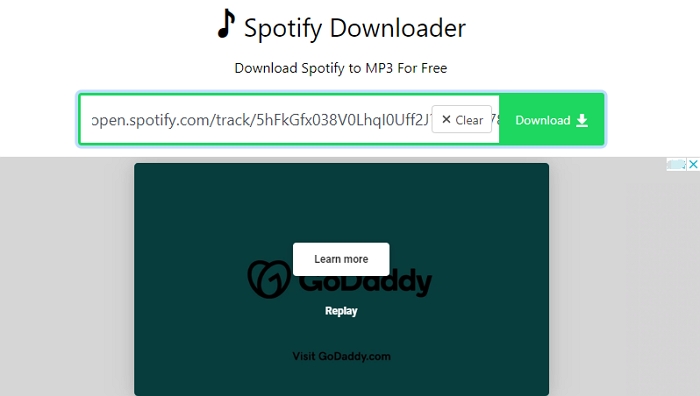
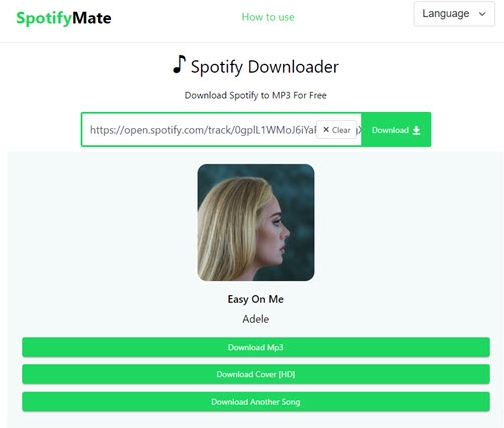
Step 4: Paste the song link into SpotifyMate and hit Download. Click Download MP3 to export the MP3 file.
Android Alternative to Spotify Downloader Chrome Extensions
Although you can use Spotify Downloader Chrome Extensions on your Android device, the steps are somewhat troublesome to follow. If you feel the same way, you can choose the Android alternative to Chrome extensions for Spotify music downloads. One of the popular Android Spotify downloader is SpotiFlyer. It downloads Spotify music mainly in MP3, a very popular and compatible media format. Besides Spotify, SpotiFlyer can also download content from JioSaavn, Gaana, and Youtube Music.
Key Features
- It’s lightweight so you don’t need a huge storage space to download it.
- Integrate with Windows and macOS also.
- Download Spotify music without premium.
Stepwise Guide to Download Spotify Songs with SpotiFlyer
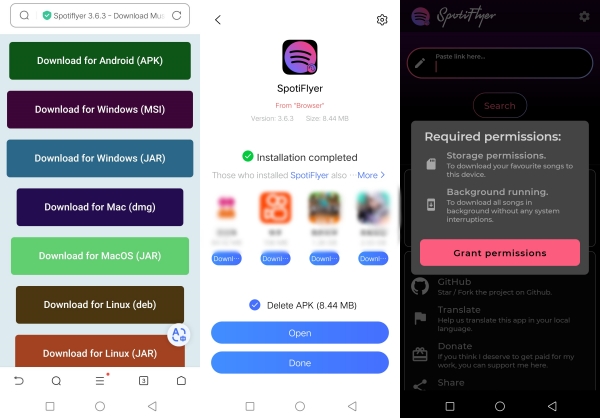
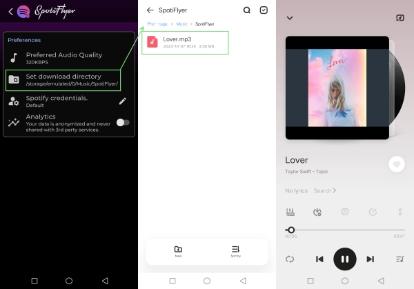
- Launch SpotiFlyer on your phone after installing the suitable version for your device.
- Next, grant the necessary permissions once the prompt appears and move to the next stage of the guide.
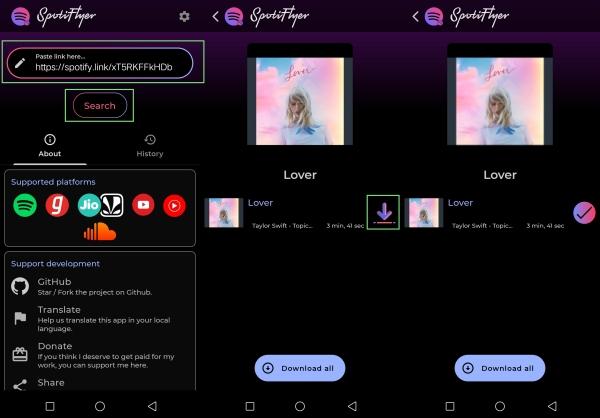
- After that, go to Spotify, and copy the sharing link to the Spotify song you want to download.
- Once done, head to SpotiFlyer and paste the link in the field provided and click Download. In case you have numerous songs, click Download All.
- Now, SpotiFlyer will start the song download to your Android local storage. Keep patient until the process is completed, then go to the File app and start streaming the songs.
Pros
- Allow you to export your Spotify songs freely to your local storage.
- Download your songs in MP3 format.
- Easy-to-use interface.
Cons
- SpotiFlyer isn’t available for iOS devices.
- It can sometimes fail to fetch your desired songs for download.
- You might have to wait forever to download a song because of the slow download speed.
iPhone Alternative to Spotify Downloader Chrome Extensions
Apart from using the introduced Spotify Downloader Chrome Extensions, there is an easier way to download Spotify locally, which is using Telegram Bots. Telegram bots like Spotify_Download_Bot are a great option to export your Spotify songs to your phone storage. With this AI technology, you can get any Spotify song in MP3 format using the corresponding song link.
Key Features
- Telegram bots provide you with a preview option to scan your Spotify songs before downloading.
- It saves your songs to your music file.
Steps to Use Telegram Bots to Download Spotify Songs
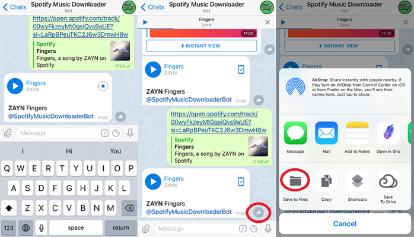
- Run Telegram on your iPhone, search for Spotify Music Downloader and click on the corresponding icon.
- Next, hit the /start icon on the following screen and input the download link to the Spotify song you want to download.
- The Spotify bot will direct you to a screen with download links to your songs.
- Preview the song, click on the three vertical dots next to the one you want to download and select Save to music.
Pros
- You don’t need to download an additional app to get your Spotify songs on your iPhone.
- Telegram bots are direct and don’t need your technical skills for you to operate them.
Cons
- The bots sometimes fail to download the songs via the link provided.
- You must be connected to a stable internet source to use this approach to download Spotify songs.
- The downloads’ quality can’t be ensured.
Comparison of Spotify Downloader Chrome Extensions and Its Alternatives
| Spotiload (Spotify VK Downloader) | Skyload | Spotify and Deezer Music Downloader | Eassiy Screen Recorder Ultimate | SpotiFlyer | Telegram Bot | |
|---|---|---|---|---|---|---|
| Ease of Use | ✅ | ✅ | ✅ | ✅ | ✅ | ✅ |
| Supported Devices | Windows and Mac | Windows and Mac | Windows and Mac | Windows and Mac | Android, Windows and Mac | iPhone, Windows, Mac, and Android |
| Supported Media Formats | MP3 | MP3 | MP3 | MP3, AAC, FLAC, and many others. | MP3 | MP3 |
| Audio Quality | Subpar | Subpar | Subpar | High | Subpar | Subpar |
| Download Speed | 1X | 1X | 1X | 1X (Real-time) | 1X | 1X |
Bonus: 2 Best Free Spotify Downloader Firefox Extensions
Perhaps you use Firefox as your default browser and need a Spotify Downloader extension to download songs from Spotify, you can select from any of the two plugins introduced below:
Spopupfy
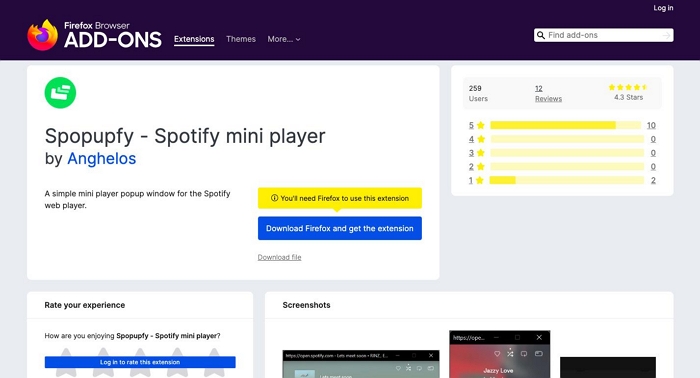
Spopupfy is one of the high-rank Spotify Downloader plugins available for Firefox users. It helps you extract songs not only from Spotify but other platforms such as YouTube, SoundCloud and several others. It powers a simple interface and works on all computer operating systems.
Key Features
- Free access to Spotify music library.
- Spopupfy takes up a minute portion of your local storage.
Pros
- Spopupfy powers a mini player which you can use to stream Spotify songs while downloading.
- Designed with a simplified UI.
Cons
- Slow download speed.
- Available only on Firefox.
SpotifyTree
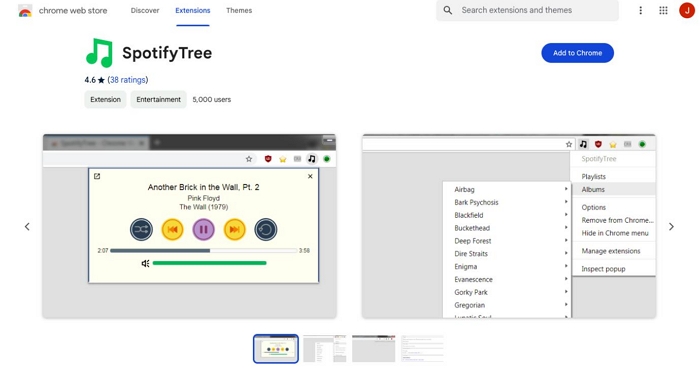
SpotifyTree is another popular Spotify Downloader extension you can run on your Firefox browser to download Spotify music offline. This program gives you full access to your Spotify library so you can download and save any song to your local storage without a premium subscription.
Key Features
- SpotifyTree lets you control your Spotify playlist via an easy popup player.
- Work with Firefox, and Chrome.
Pros
- Easily stream Spotify songs in one click.
- Use the basic keyboard shortcuts to control Spotify music while streaming.
Cons
- Can only work when you have an internet connection available.
- No search option.
- Fail to lower the volume sometimes.
Conclusion
With the 7 Spotify song downloaders introduced above, exporting your Spotify songs to your local storage shouldn’t be a challenge for you any longer. Select any Spotify downloader chrome extension of your choice and start using it. However, before making your choice of tool, always consider the pros and cons linked to each one. A reliable screen recorder like Eassiy Screen Recorder Ultimate is one of the best options from the list as it captures your audio with high quality and saves it permanently. The cons associated with this desktop recorder are minimal, making it a highly reliable choice to save your favorite audio securely.