Help Center
Updated on 2026-05-09
views
5min read
If your iPhone keeps popping up with a "Battery Not Recognized" warning, you're not alone. You might be staring at a persistent red badge in your Settings, an "Unknown Part" label on your About page, or a completely blank Battery Health screen. Naturally, this can make you worry about your phone's safety, random battery drains, or sudden shutdowns.
But don't panic. These symptoms don't just happen randomly—they follow a very specific pattern. Based on our experience, this is a staged process where temporary alerts gradually turn into permanent system warnings. In this guide, we’ll break down exactly what your iPhone is doing, why it’s doing it, and how you can handle it.
What Happens When Your Battery Isn't Recognized?
The Annoying Battery Not Recognized Pop-Up
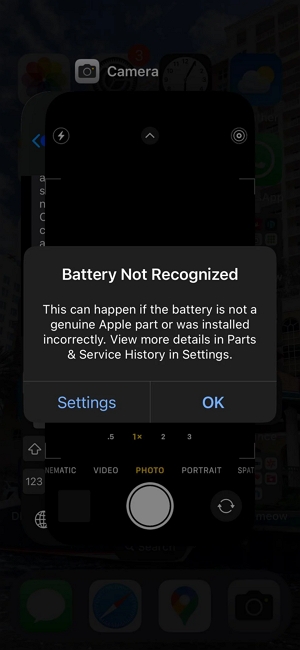
Right after a battery replacement, your iPhone will flash a persistent warning on your screen. It essentially tells you that the system can't verify if your battery is a genuine Apple part or if it was installed correctly.
You’ll also see more details if you check the "Parts & Service History" in Settings. This alert can feel pretty intrusive during your daily usage, but it usually goes away on its own after four to seven days.
About a week later, that screen alert will fade, but the underlying issue doesn't. Instead, your Settings app will show a stubborn red notification badge. Unlike other notifications, this badge won't clear on its own—it acts as a long-term reminder that your iOS simply doesn't recognize the battery.
Picture source: Reddit
The "Unknown Part" Message in Battery Settings
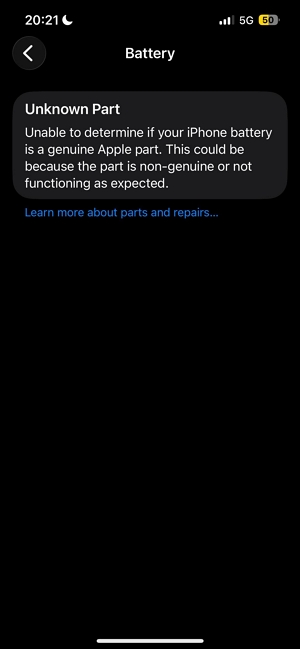
The clearest proof of the issue is hidden in your device info. If you go to Settings > Battery, your battery will be officially flagged as an “Unknown Part.” This simply means iOS cannot verify the battery’s authenticity or pair it with your iPhone’s motherboard. Even if the battery works flawlessly, your iPhone will treat it as unverified hardware.
Picture source: Reddit
Battery Health Not Available
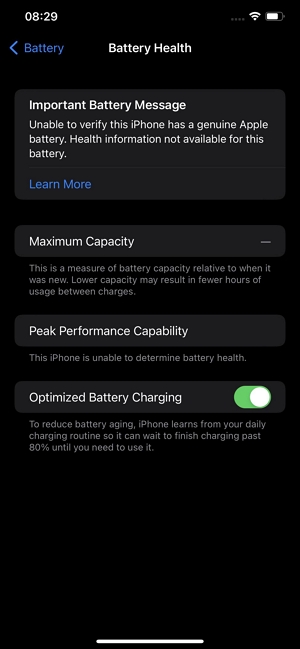
This is arguably the most frustrating part: iOS permanently disables your Battery Health menu. Your Maximum Capacity will just show a blank dash (—). Because of this, you lose total visibility into your battery’s actual lifespan, making it hard to know how well your device is performing or when you might actually need another replacement in the future.
Picture source: Reddit
Why Is Your iPhone Showing Battery Not Recognized Error?
At first glance, you might think you just got a cheap, defective, or fake battery—especially if you went to a local, non-Apple repair shop. But the real reason goes much deeper than the quality of the battery itself.
It Usually Happens After Third-Party Repairs
If you recently visited an independent repair shop to get a non-Apple aftermarket battery, this is the direct trigger. iOS is programmed to automatically detect if a battery lacks official Apple authentication data. Once it notices this data is missing, it immediately throws the "Not Recognized" warning, regardless of how well the battery actually performs.
Starting with the iPhone XS, Apple introduced a process called "serialization" (often referred to as parts pairing). At the factory, Apple cryptographically pairs the battery’s microchip (the BMS) directly to the iPhone’s logic board. Think of it as a digital padlock. If the software doesn't recognize the exact serial number of the new battery, it triggers the warning—even if the battery is in perfect condition.
Even Genuine Apple Batteries Fail This Test
Here is the catch: Even if you take a 100% genuine Apple battery out of a brand-new iPhone and put it into yours, you will still get the "Not Recognized" warning. You will still lose your Battery Health data. Why? Because the serial numbers don't match. This proves that the warning is essentially a digital DRM-style lock, not a simple "fake part" detector. Only official Apple technicians have the proprietary software tools required to sync the new serial number and clear the warning.
Is Apple Changing This Rule?
This strict serialization policy isn't limited to batteries anymore. For newer models like the iPhone 14 and 15 series, swapping out displays, cameras, or other key components without official authorization will also lead to system warnings or disabled features.
Thanks to growing pushback from the Right to Repair movement, Apple announced a slight shift in policy in 2024: they will start allowing the reuse of genuine used parts without triggering these warnings. However, this is currently very limited and mainly applies to the iPhone 16 and newer models. If you have an older iPhone, you are still stuck with the original, strict part verification system.
How to Handle the Battery Not Recognized Warning?
Because this is a hardware-level verification lock, there is no magic software hack or app that can bypass the alert. The message stays until the device is fixed using Apple-approved tools. However, depending on your budget and needs, you have three practical options:
Option 1: Just Live With It
If your phone is working fine, you can simply ignore the alert. A high-quality third-party battery will still give you great charging speeds, usage time, and performance. The warning is literally just an informational alert—it does not throttle your battery life or slow down your phone. It’s annoying, but entirely harmless.
Option 2: Get an Official Apple Repair
If you hate the warning and want your Battery Health data back, your best bet is to pay Apple (or an Apple Authorized Service Provider) for an official replacement. They will use their proprietary system tools to properly pair the new battery to your logic board, clearing all warnings and restoring your phone to a 100% verified state.
Option 3: BMS Micro-Soldering for Advanced Techs
This is a highly technical workaround. An experienced repair technician can extract the original Battery Management System chip from your old battery and spot-weld it onto a new aftermarket battery cell. Because the original paired chip is kept intact, your iPhone is tricked into thinking the original battery is still installed. As a result, you avoid all system warnings and retain full access to your Battery Health menu.
What If Your iPhone Keeps Restarting?
In rare cases, your "Not Recognized" warning might be accompanied by your iPhone constantly crashing or stuck in a reboot loop. This is not a software DRM issue—this is hardware damage.
If your phone keeps shutting down, the root cause is usually a loose or broken battery flex cable. The phone forces itself to shut down as a safety measure because the battery connector is no longer properly aligned. If you experience this, stop using the phone and immediately have the physical battery connection inspected to prevent serious hardware damage.
The Bottom Line
Seeing an "iPhone Battery Not Recognized" alert doesn't automatically mean your battery is trash. More often than not, it’s just the result of Apple’s incredibly strict parts pairing system. While losing your Battery Health data and seeing "Unknown Part" can be frustrating, your iPhone will generally continue to function perfectly fine. As long as your battery isn't physically loose or causing your phone to crash, you can safely continue using your device without worry.