Help Center
Updated on 2026-07-03
views
5min read
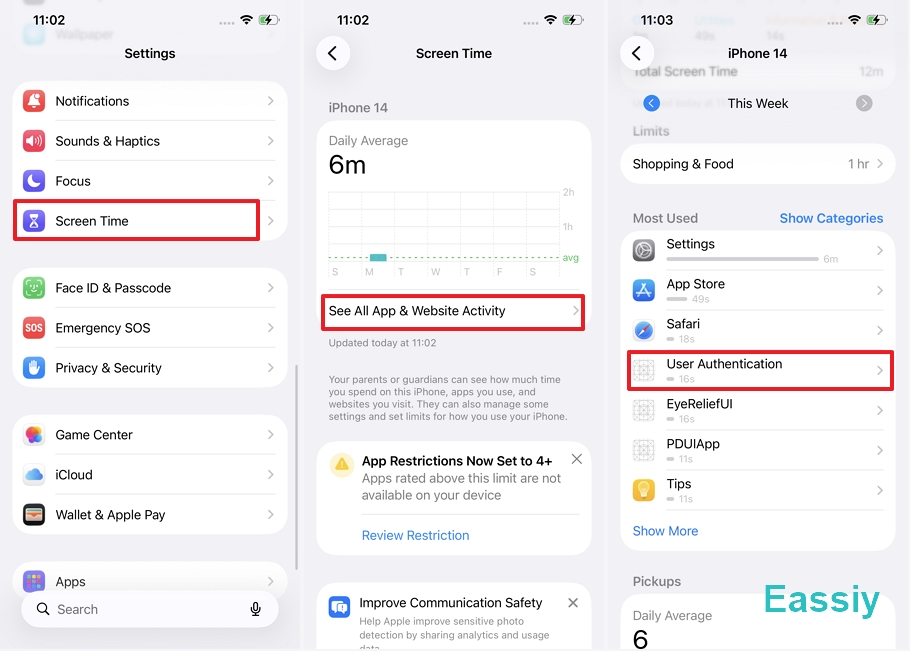
If you have checked your Screen Time report recently on your iPhone and found a mysterious entry labeled "User Authentication" racking up minutes—or even hours—you are not alone. This "ghost app" has sparked significant confusion on platforms like Reddit and Apple Support communities, leading many iPhone users to worry about privacy breaches or remote monitoring.
We put this to the test in our lab. Based on our findings across multiple iPhones and firmware versions—including the latest iOS 26.4.2—here is the definitive guide to what User Authentication is on iPhone Screen Time, why it appears, and how to handle it.
What Is "User Authentication" in iPhone Screene Time?
User Authentication is not a standalone app you downloaded. It is a visual representation of a system-level process known as AuthKit (Authentication Kit).
According to Apple’s Developer Documentation, the system utilizes the LocalAuthentication framework to manage biometric challenges. Every time your iPhone verifies your identity, this process is triggered. You are likely seeing this due to:
- App Locks: Using Face ID or Touch ID to open secured apps (e.g., WhatsApp, Banking apps, or hidden folders).
- Face ID / Touch ID Prompts: Authorizing an App Store purchase or Apple Pay transaction.
- Password Autofill: When the system verifies your biometrics before filling in a saved password in Safari or third-party apps.
- Attention Awareness: The sensors checking if you are looking at the screen to prevent it from dimming.
Why is User Authentication showing up in Screen Time?
Screen Time is designed to track "active screen usage." When a Face ID bubble or a password prompt appears, it creates an active UI layer. In certain iOS versions, the system’s reporting logic mistakenly categorizes this authentication window as an "active app" rather than a background system task.
2. User Authentication Still Exists on iOS 26.4.2
One of the most confusing aspects of this issue is its inconsistency across different firmware versions. User feedback on Reddit and the Apple Support Communities suggests that this "User Authentication" entry began appearing prominently immediately after the iOS 18.1 update.
Our Lab Findings:
- iOS 15.8.7: Clean. Our tests showed no "User Authentication" entry in the Screen Time reports, even after repeated Face ID triggers.
- iOS 18.5: Clean. It appears Apple successfully patched the reporting logic in this version to ensure system processes remain invisible to the user.
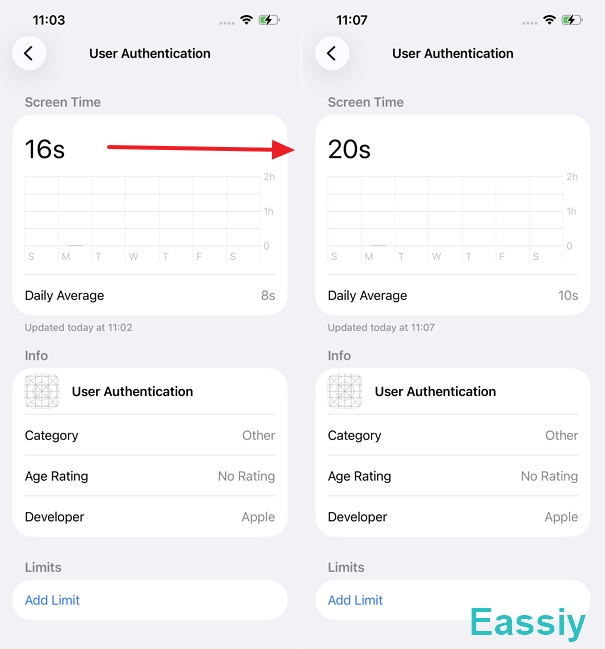
- iOS 26.4.2: Issue Confirmed. Surprisingly, our testing on iPhone 14 running iOS 26.4.2 reveals that "User Authentication" has returned.
In the current iOS 26 environment, this might no longer be considered a "bug" by Apple. As the system moves toward higher transparency for its Secure Enclave (the hardware that handles your biometrics), iOS now logs every second spent on a biometric challenge.
Our tests showed a direct 1:1 correlation: the more we used Face ID for app access and downloads, the more the "User Authentication" timer increased. In Apple's eyes, the time you spend verifying your identity is now officially counted as "active" Screen Time.
3. Is User Authentication a Security Risk?
No. Seeing "User Authentication" in your report does not mean you are being hacked or that your device is being monitored.
- Community Evidence: On Apple Support Communities, , over 600 users have reported this exact issue, confirming it is a widespread system phenomenon rather than an individual security breach.
- Technical Reality: It is simply the system’s AuthKitUIService being over-reported in the logs. The system is essentially "counting" the time the authentication interface is active in the background.
The only time this warrants attention is if "User Authentication" runs for several hours while you are asleep or when the phone is idle. This doesn't necessarily mean a hack, but it could indicate a "verification loop" where a system process is stuck trying to sync credentials with iCloud.
Another common follow-up question is whether this activity impacts battery life. In our lab tests, the impact was negligible. Since this is primarily a reporting error for a process that was already running (like Face ID standby), it doesn't represent "extra" work for your processor—it just shows that the system is being a bit too transparent about its background activity.
Unless you notice extreme spikes during inactive hours, this entry is a harmless reflection of your iPhone's biometric security doing its job.
4. How to Fix or Reduce User Authentication Time
If you want to clean up your reports or stop the system from misreporting this data, try these lab-verified solutions:
Method 1: Remove Face ID from Specific Apps
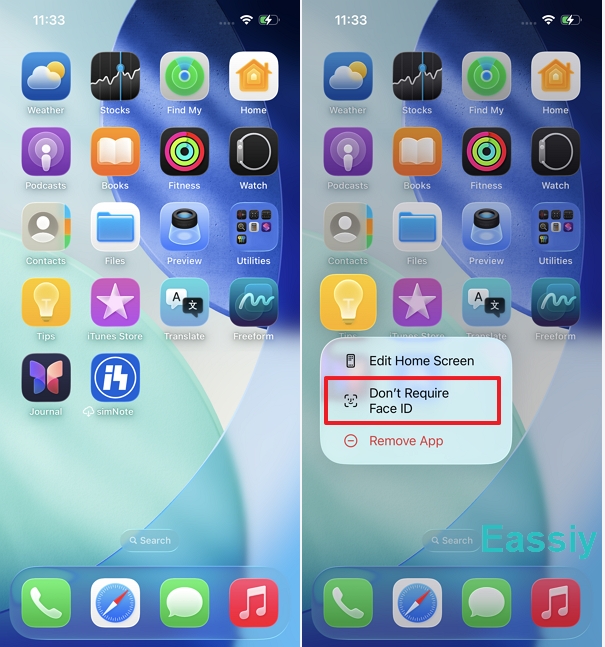
On iOS 26, the timer is heavily driven by "App Locks." If you have secured 10+ apps with Face ID, every switch between apps adds to the timer.
- Long-press the app icon on your Home Screen.
- Select Don't Require Face ID.
Note: Only do this for apps that do not contain highly sensitive data to maintain your privacy.
Method 2: Toggle "Share Across Devices"
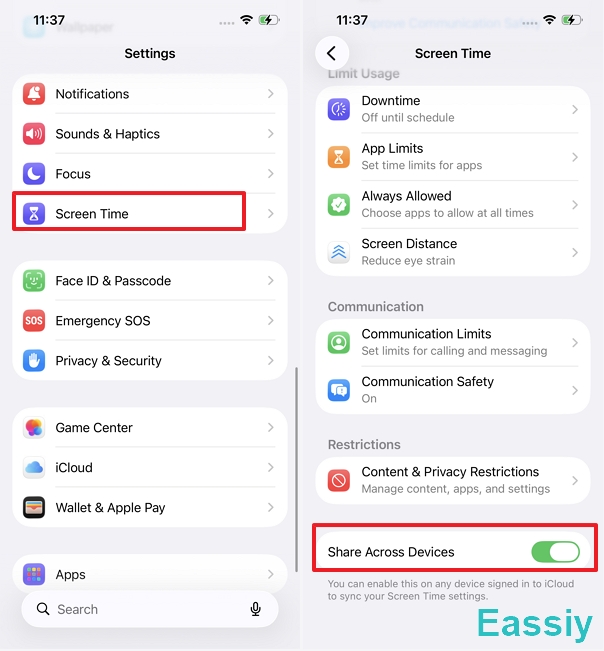
Syncing errors between an iCloud-connected iPad and iPhone can cause authentication tokens to "hang."
- In Screen Time settings, toggle Share Across Devices to OFF.
- Wait 30 seconds and toggle it back ON. This forces a fresh "handshake" with Apple’s servers.
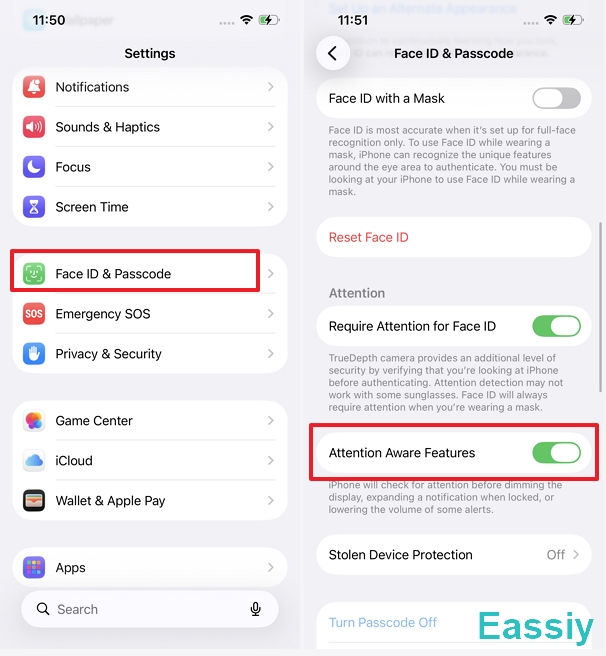
Method 3: Disable Attention Awareness Features
According to Apple Support Documentation, your iPhone checks for your attention before dimming the display. This constant "check" can trigger the authentication process in the background.
- Go to Settings > Face ID & Passcode.
- Turn off Attention Aware Features.
Method 4: Turn Off App & Website Activity
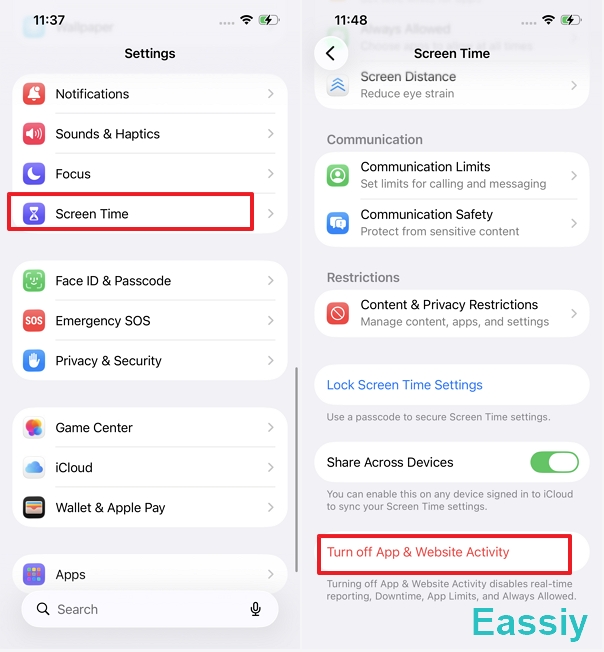
If the entry shows unrealistic time (e.g., 10+ hours a day), the local database is likely corrupted. You can fix the issue by completely turning off app and website activity tracking on an iPhone:
- Go to Settings > Screen Time.
- Scroll to the bottom and tap Turn Off App & Website Activity.
- Confirm by tapping Turn Off in the popup.
Final Thoughts
While "User Authentication" in iPhone Screen Time was a genuine reporting bug in early iOS 18 builds, its persistent presence in iOS 26.4.2 suggests it has evolved into a permanent part of Apple's transparent security reporting. It is a harmless—albeit slightly annoying—reflection of just how often your iPhone's biometric security works behind the scenes to keep your data safe.