Help Center
Updated on 2026-04-02
views
5min read
YouTube Members-only videos are exclusive content reserved for paid subscribers. But is there a way to watch them for free—and legally? And more importantly, can you find a safe method for how to record members-only videos on YouTube for offline viewing?
What You’ll Learn in This Article:
- Legal Workarounds: Learn about legitimate methods like free membership trials and creator giveaways that offer temporary access to Members-only content on YouTube.
- Risky & Unreliable Methods: Understand how common internet tricks (e.g., “Inspect Element,” VPNs) claim to help you access or record YouTube Members-only videos—and why they’re often unsafe or ineffective.
- Bonus Tip: If you're simply looking to watch regular YouTube videos offline, we’ll also introduce a safe, efficient tool to help you capture content for later viewing on your device.
Part 1: What are "Members-only Videos" on YouTube?
Launched in 2018, YouTube Channel Memberships allow creators to offer exclusive content — such as members-only videos — to fans who pay a monthly fee. These videos appear with a lock icon, meaning they’re only visible to active channel members.

Part 2: Can you watch YouTube Members-Only Videos for Free?
Yes, but only under certain conditions. YouTube does not offer free access by default, and bypassing its paywall violates its Terms of Service. That said, there are legal and safe methods to access select content without paying.
Part 3: Legal Ways to Access YouTube Members-Only Videos
While Members-only videos are typically locked behind a paywall, YouTube does offer a few official and legal methods to access them—at least temporarily. These options don’t violate YouTube’s Terms of Service and can give you a taste of exclusive content without immediate cost. Let’s explore the most reliable legal way first: using a YouTube membership free trial.
Method 1: Use a YouTube Membership Free Trial
Some YouTube channels offer a free trial membership, typically lasting from 1 to 7 days.
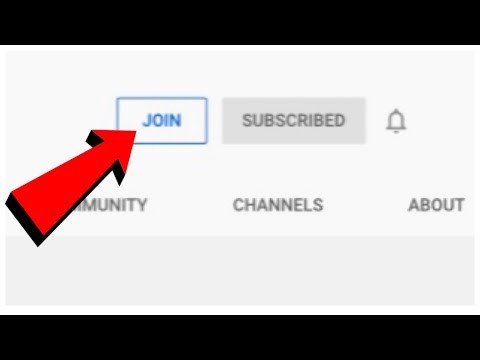
Step 1: Go to the creator's YouTube channel and click the Join button.
Step 2: If a free trial is available, you’ll see it before confirming payment.
Step 3: Enter your payment info (you won’t be charged if you cancel before the trial ends).
Enjoy your free viewing period.
Pros:
- This method is 100% legal.
- Members get full access to content during the trial period.
Cons:
- Not all channels offer free trials.
- Requires canceling manually to avoid charges
Method 2: Check for Public Reuploads
Here is an unofficial method that works only for some members. It allows viewers to watch content reposted by others.
Step 1: Search Google/YouTube for
- Channel Name + Members Only Video Title
- Channel Name + Members Archive
Step 2: Look for reuploads. You can often find them on Dailymotion, Vimeo, or shady sites.
Warning – Reuploads might be of low quality. They could be incomplete videos. Some might even be taken down.
Method 2: Get Access via a Friend (With Consent)
If someone you know already has a membership, you can ask to watch with them.
Options include:
- Watching together on their device
- Logging into their account with permission
Caution: Never share or request login details without trust and consent.
Method 4: Try Archive Sites (Risky and Unreliable)
Here is a method that can be unreliable. It works for archived versions of deleted/members-only videos:
Step 1: Try Archive.org (Wayback Machine) or Rentry.co/membersvids. Please note that it is a community-driven website and may be outdated.
Step 2: Search the video URL or channel name.
Warning: This method rarely works for new videos. Besides, some archives can be incomplete.
Method 5. Look for Creator Giveaways
Occasionally, creators offer gift memberships or temporary access via:
- YouTube’s Community tab
- Discord or Patreon pages
- YouTube Live streams
Be sure to follow your favorite creators for such perks.
Methods You Should Avoid
While you may find tips online promising free access, these are unsafe or ineffective:
- Inspect Element or Developer Tools: These don’t unlock video content.
- VPN or Proxy Tricks: Memberships are account-based, not region-based.
- Free Membership Generators: These are scams and often install malware.
Part 4: How to Record Videos?
Eassiy Screen Recorder Ultimate is a reliable option that allows users to capture video from any streaming site or live content on their device. It supports audio recording, customizable quality, and real-time annotations for efficient offline viewing.
Eassiy Screen Recorder Ultimate
Record videos from streaming sites, live streams, or regular video players in high quality, with options to customize resolution, audio, and formats.
Key Features
- Record video from any website or live stream.
- Supports high-quality audio recording with system sound and microphone.
- Customize resolution, format, and mouse cursor effects.
- Add annotations or schedule recordings easily.
Step-by-step Process
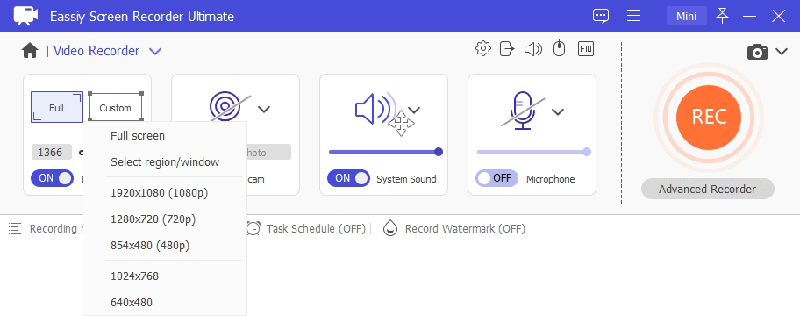
Step 1: Choose Recording Area
Open Eassiy Screen Recorder and select whether to record full screen or a custom region. Enable webcam if you wish to include live video.
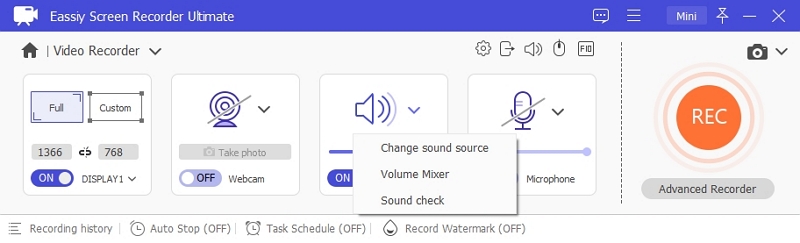
Step 2: Set Audio
Turn on system sound and microphone to capture video audio. Adjust volume sliders as needed.
Step 3: Customize Recording
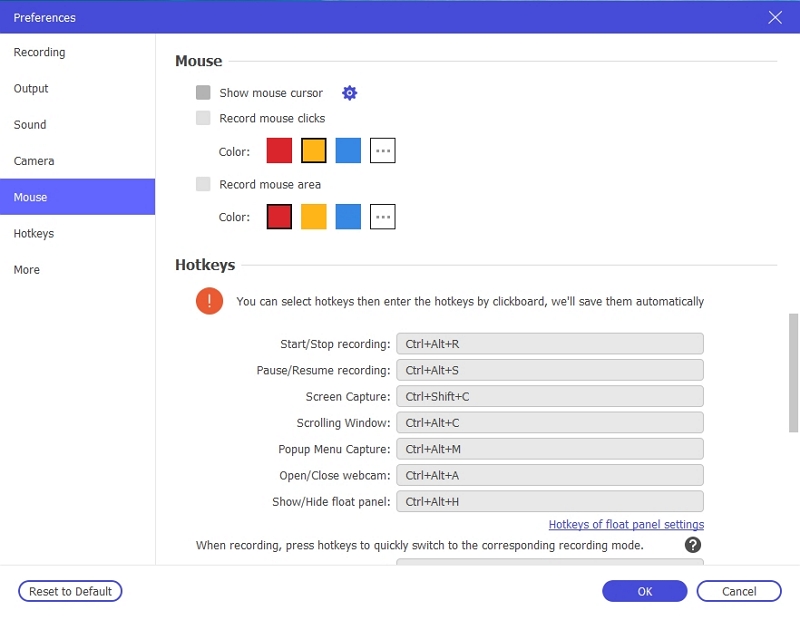
Go to More Settings to set hotkeys, cursor effects, recording format, and other preferences.
Step 4: Start Recording
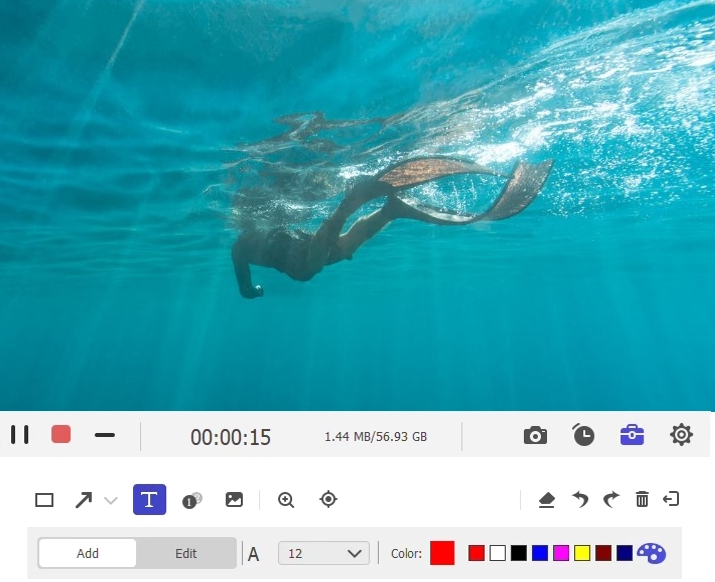
Click the REC button to begin recording the video. You can also annotate or schedule recordings while recording.
Step 5: Stop and Save
Click Stop to finish recording. The video is saved to your device for offline viewing.
Part 5: Frequently Asked Questions:
Q1. Is there a 100% free way to watch Members-Only videos?
Only if the creator offers a free trial or gift membership. Otherwise, membership is required.
Q2. How can you record YouTube membership videos for offline use?
YouTube does not allow free users to download videos. However, desktop tools like Eassiy Screen Recorder allow you to capture videos safely for offline viewing.
Q3. How do you join Members-Only content on YouTube?
You must purchase a channel membership (paid monthly) account. Here’s the step-by-step process.
Method 1: Join via YouTube
Step 1: Access the channel that offers memberships. Look for the “Join” button.
Step 2: Click “Join.” Choose a tier.
Step 3: Enter your payment information.
Step 4: Confirm your membership.
Method 2: Accept free gift membership.
Some creators give free trials. You can check “Community Tab” or “Discord” for giveaways.
Method 3: Use YouTube Premium Perks (A Rare Option)
A few creators offer exclusive perks for Premium users. You can check under “Benefits” in the channel’s membership section.
Conclusion
Members-only videos on YouTube offer exclusive content as a reward for loyal supporters. While full access typically requires a paid membership, free trials or giveaways can provide limited-time access. If you're looking to record members-only YouTube videos for offline viewing, be sure to do so only when permitted by the creator. For public videos, tools like Eassiy Screen Recorder provide a secure and reliable way to capture YouTube content in high quality. Above all, remember to respect content ownership — support your favorite creators by subscribing or becoming a member whenever possible.