Help Center
Updated on 2026-04-16
views
5min read
Almost everyone has bought some products online from Amazon. You must have seen that some Amazon products have videos providing crucial insights into the item. You can download such Amazon product videos to maintain a record of your purchase. You can download and watch them later offline. Amazon sellers also love downloading product videos to boost their sales. However, you must know that Amazon imposes specific restrictions on product video downloads for various reasons.
This article discusses how to download Amazon product videos on laptops differently. We shall also discuss the limitations and see how to overcome them using a specific solution.
- Method 1: Use Online Video Downloader Tools
- Method 2: Use Browser Extensions
- Method 3: Inspect Element (Advanced method)
- Method 4: Screen Recording Software
Part 1: Can You Download Amazon Product Videos?
Technically, you can download Amazon product videos, but specific limitations, restrictions, and legal risks are involved. Amazon uses Digital Rights Management (DRM) techniques to protect its content from copyright infringement. Therefore, users must respect copyright laws, Amazon's terms of service, and the legitimate rights of content creators.
Let’s discuss the technical issues related to downloading Amazon product videos.
- DRM Protection: Amazon is committed to protecting the copyrights of its content creators. Hence, its videos are protected by DRM, which prevents unauthorized downloading or copying. Therefore, it becomes challenging to download Amazon product videos using standard methods.
- Video Quality: Downloaded videos do not retain their original quality. Much depends on the video's source. Methods like screen recording software and online downloaders do not always produce the best results.
- Browser and Platform Compatibility: Some methods do not work on all browsers or devices. For instance, certain browser extensions are available for specific browsers like Chrome or Firefox.
- Dynamic Content: Sometimes, Amazon content is not directly accessible through URL copying or Inspect Element because Amazon product pages often use dynamic content loading.
- Security Risks: Online downloaders and browser extensions are not always reliable. Some may even pose security risks.
- Legal Considerations: Amazon’s terms of service prohibit downloading or copying content from their platform without permission. Violating these terms can result in copyright infringement and suspension of your account. Downloading product videos for commercial use is always illegal.
- Ethical Considerations: Amazon sellers and brands invest a lot of time and resources in creating product videos. Hence, downloading a video for commercial use is ethically incorrect. You must ensure that it is strictly for personal use and not for illegal sharing and distribution.
Our magic solution considers all these limitations, restrictions, and considerations to provide users with the best way to download Amazon product videos on their laptops.
Part 2: The Reasons for Downloading Amazon Product Videos
Amazon product videos are helpful for sellers and shoppers alike. Buyers get a clearer understanding of the product by watching the video, and sellers find product videos as sales promotion tactics. Let’s discuss the different reasons why people download Amazon product videos.

- Videos are better at describing products than static images. Buyers download product videos to get a 360-degree view of the product they wish to buy. It enables them to view the product properly and discuss it at length.
- Downloading Amazon products allows buyers to watch them at any time. They can revisit the content and check out things they might have missed in the first place, which helps customers make informed decisions.
- Customers can know more about the product by watching videos than by reading customer reviews. Videos also benefit sellers by allowing them to explain the detailed features more conveniently than catalogs.
Part 3: Compare Different Ways to Download Amazon Product Videos on Your Laptop
Despite technical limitations and legal restrictions, Amazon users can download product videos on their laptops differently. We will discuss these methods in detail, but let us compare them quickly to give you a better idea.
| Method | Ease of Download | Time Required | Legitimacy |
|---|---|---|---|
| Online video downloaders | Easy to moderate, depending on the tool | Quick | Questionable, may violate terms |
| Browser Extensions | Easy | Quick | Questionable, may violate terms |
| Inspect Element | Moderate to difficult | Moderate | Questionable, may violate terms |
| Screen recording software | Easy | Moderate | Legitimate for personal use |
Part 4: How to Download Amazon Product Videos
We have compared five different methods of downloading Amazon product videos. The methods are easy, but users must consider Amazon's limitations and restrictions before using them. Downloading Amazon product videos for personal use is legitimate. Let’s discuss these five methods in detail.
Method 1: Use Online Video Downloader Tools
Online video downloader tools such as KeepVid, Y2Mate, or SaveFrom.net facilitate users to download Amazon product videos on their laptops.
Step 1: Visit the Amazon product page and locate the desired video.
Step 2: Right-click on the chosen video and select "Copy the link address" or "Copy video URL."
Step 3: Open your preferred online video downloader tool and copy-paste the URL into the tool's search bar.
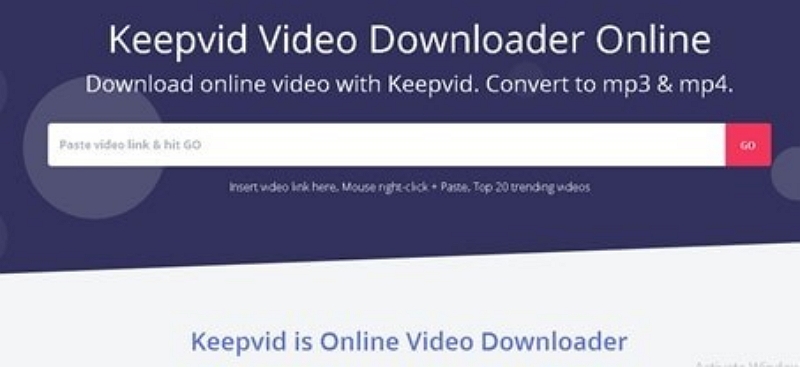
Step 4: You can change the video quality. Click "Download."
Step 5: The tool processes your request and downloads the video. You will receive a download link. Clicking on it saves the video to your laptop.
Method 2: Use Browser Extensions
Browser extensions are useful for downloading Amazon product videos. However, consumers should note that they are available for Chrome, Firefox, and Edge browsers.
Step 1: Depending on your browser, install a browser extension, such as Video DownloadHelper. This extension is available for Chrome, Firefox, and Edge.

Step 2: Visit the Amazon product page and play your desired video.
Step 3: The extension detects the video and displays a download button.
Step 4: Click on it to download and save the video to your laptop.
Method 3: Inspect Element (Advanced method)
Let’s discuss an advanced method of downloading Amazon product videos. Users must possess some technical knowledge to try this method.
Step 1: Right-click on the chosen video and select “Inspect.” Alternatively, press “Ctrl+Shift+l” on Windows or “Cmd+Option+l” on Mac to open Developer Tools.
Step 2: Go to “Network” tab and filter by “Media.”
Step 3: Play the Amazon product video. You will see a media file appear in the list.
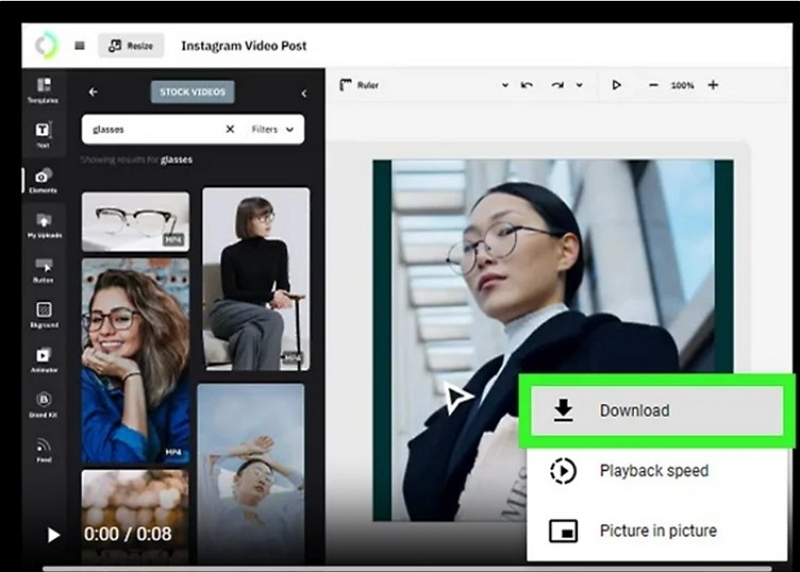
Step 4: Right-click the media file and select “Open in New Tab.”
Step 5: Right-click the video in the new tab and select "Save the Video As" to download and save it on your laptop.
Method 4: Recording Videos Using Eassiy Screen Recorder Ultimate
The comparison table shows that Eassiy Screen Recorder Ultimate is a powerful and flexible tool for capturing any video playing on your screen and saving it permanently for offline viewing. With its high-quality recording engine, Eassiy Screen Recorder Ultimate ensures that your videos are saved in full quality without any restrictions.
The recording process with Eassiy Screen Recorder Ultimate is straightforward, and the setup is easy and user-friendly. It is available for both macOS and Windows operating systems.
Let's take a closer look at the features that make Eassiy Screen Recorder Ultimate a popular choice for capturing product videos:
- Records any on-screen video in up to 4K resolution with no quality loss.
- Captures system audio and microphone simultaneously for a complete recording experience.
- Supports output formats including MP4, MKV, and MOV for broad device compatibility.
- Flexible recording area — capture full screen or define a custom region around the video player.
- Easily transfer your recorded videos to external hard drives or USB drives for portable viewing.
Step-by-Step Guide to Record Product Videos Using Eassiy Screen Recorder Ultimate:
Step 1: Download and install Eassiy Screen Recorder Ultimate from the official website. Launch the program and select Video Recorder from the main interface.
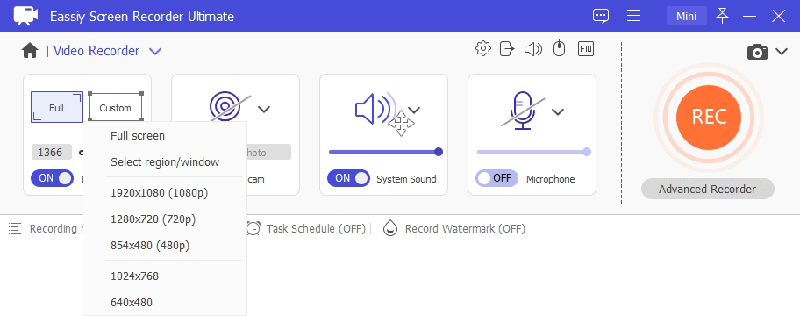
Step 2: Select your recording area. Choose full screen or drag to define a custom region around the video player window.
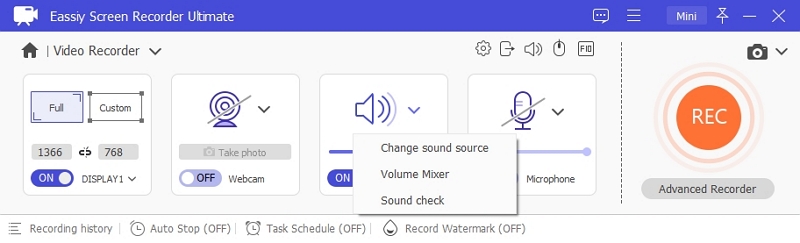
Step 3: Enable System Sound to capture the video's audio. Adjust the volume slider to your preference.
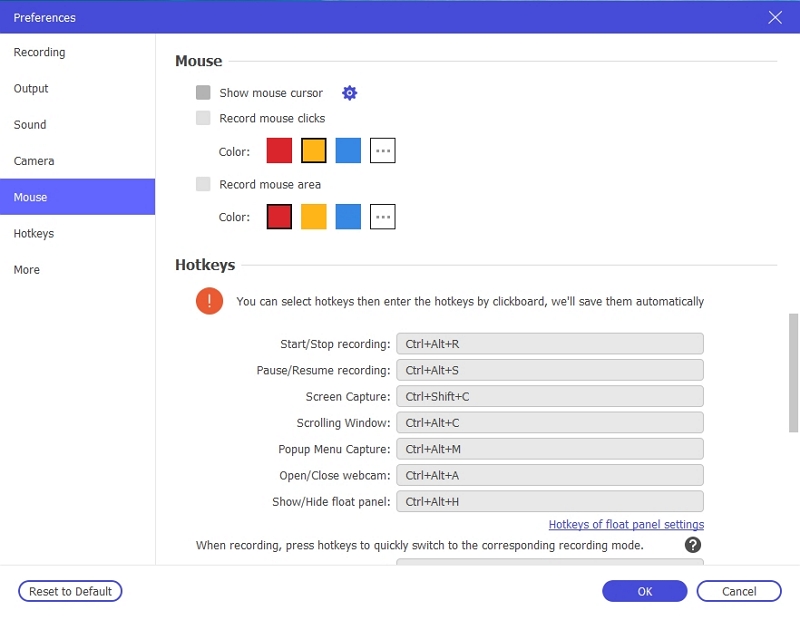
Step 4: Open Preferences to configure your output format (MP4, MKV, or MOV), video quality, and hotkeys before starting.
Step 5: Play the video on your screen, then click the REC button to begin recording. Use the annotation toolbar to add highlights or notes in real time if needed.
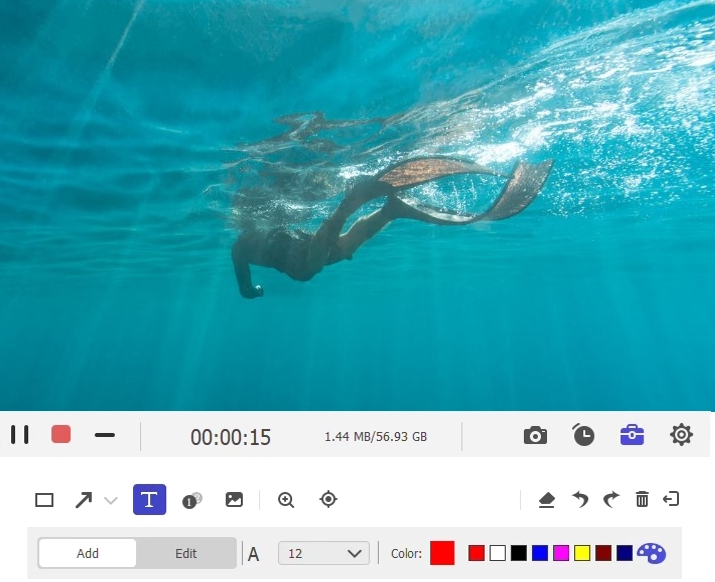
Step 6: Click the Stop button when the video finishes. The recording will be automatically saved to your computer and ready for offline playback at any time.
With Eassiy Screen Recorder Ultimate, capturing product videos is quick and easy. You can enjoy your saved videos offline, in high quality, and in your preferred format!
Part 5: Frequently Asked Questions
Q1. Is it legal to download Amazon product videos on your laptop?
Technically, the answer is no. Downloading Amazon product videos without permission violates Amazon's Terms of Service and can infringe copyright laws. Amazon uses DRM protection to protect its content from copyright infringement. Therefore, it is better to seek permission from the content owner or Amazon before downloading.
Q2. Can you download DRM-protected videos from Amazon?
You cannot download DRM-protected videos from Amazon and use them for commercial purposes. However, you can obtain permission to download Amazon product videos for personal use.
Q3. What is the easiest way to download Amazon product videos?
Of the five methods discussed here, using Eassiy Screen Recorder Ultimate is one of the easiest ways to capture Amazon product videos for personal offline viewing. Its simple interface and flexible settings make the process quick and straightforward.
Q4. What are the risks of using 3rd party tools for downloading Amazon product videos?
The primary risk is violating Amazon's terms of service and copyright laws. Downloaded videos may not be of the same quality as the original. Third-party tools can be unreliable and may not work consistently, especially for DRM-protected content. In addition, using third-party tools makes your systems vulnerable to cyberattacks, such as malware, spyware, or phishing attempts.
Conclusion
Anyone shopping on Amazon knows the value of saving product videos because they give deep insights into the product's quality and functioning. However, capturing Amazon product videos is not always easy due to copyright infringement and other technical issues. In this article, we have discussed five ways to save Amazon product videos. Among them, Eassiy Screen Recorder Ultimate stands out as a reliable and user-friendly solution for capturing and storing videos safely for personal use without breaking the law.