Help Center
Updated on 2026-04-17
views
5min read
Spotify bot downloaders have become a popular way to save your favorite tracks, playlists, and even full albums—right inside Telegram. No need to install external apps: just drop a link and get the download. But the problem? These bots vanish as quickly as they appear, leaving users scrambling to find alternatives.
Part 1. Overview of Spotify Downloader Bots on Telegram
Telegram bots don’t actually download from Spotify’s servers due to DRM protection. Instead, they:
- Extract metadata from your link (title, artist, album)
- Search for matches on platforms like YouTube, Deezer, or Saavn
- Deliver the song file (usually MP3/M4A)
This workaround is clever but has a catch—audio quality and song matching aren’t guaranteed.
Most Telegram bots max out at 128–320 kbps and rely on third-party sources. If you're an audiophile, this isn’t ideal. — Rishi Malhotra, Audio Engineering Consultant
Audio Quality of Telegram Bots
The audio quality you get is tied to the quality available on those platforms, typically at around 128kbps. While some Telegram bots manage to deliver music at 320kbps, matching Spotify’s top-tier quality, the reality is, the tracks will often be lossy and not perfectly tuned, since they aren’t sourced directly from Spotify. So, choose them only if you are not a stickler for absolute pristine quality.
Are Spotify Downloader Bots on Telegram Safe?
Since everything happens within Telegram, there’s no need to install external software or worry about malware lurking in the shadows. However, always be cautious, if a bot tries to push additional apps or files on you. That’s where the risks can creep in.
Part 2. Best Spotify Song Downloader Bots on Telegram
Coming to the well-reviewed bots’ options, it’s always recommended to stick with reliable Telegram bots: both for safety and also to avoid the frustration of them being banned or removed, as is the case with most bots. That said, here are three top Spotify song downloader bots.
1. SpotifySaveBot (@SpotifySaveALotBot)
Rating: ★★★★☆ (4.2/5)
Audio Quality: 128 kbps (M4A/AAC)
Ease of Use: ★★★★★ – Plug-and-play
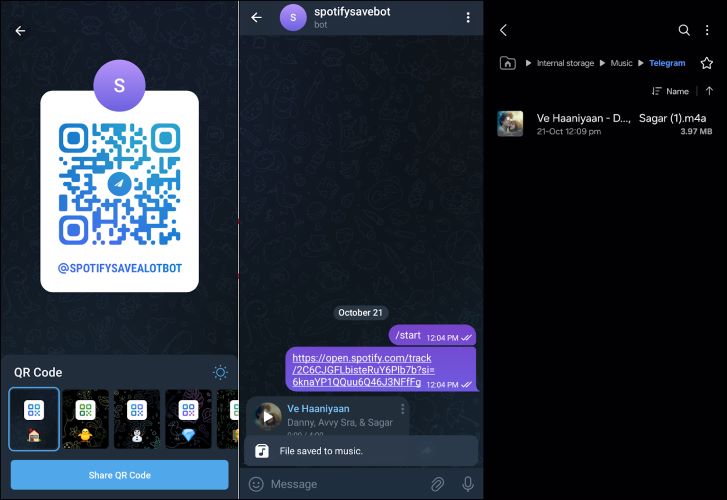
SpotifySaveBot taps into YouTube Music to pull tracks and wraps them up in M4A or AAC at 128 kbps. It’s fast, especially if the track’s already been fetched before by other users, as the bots store them in its library. But this doesn’t mean you can’t download other songs. It will also give you album covers and keep your downloads neat and organized.
This is one of the fastest bots I’ve used for casual downloading. Just don’t expect consistent quality across all tracks. — Elena Zhao, Independent Music Blogger
2. Music Downloader (@SpotSeekBot)
Rating: ★★★★☆ (4.3/5)
Audio Quality: Up to 320 kbps (MP3)
Ease of Use: ★★★★☆ – Requires channel join
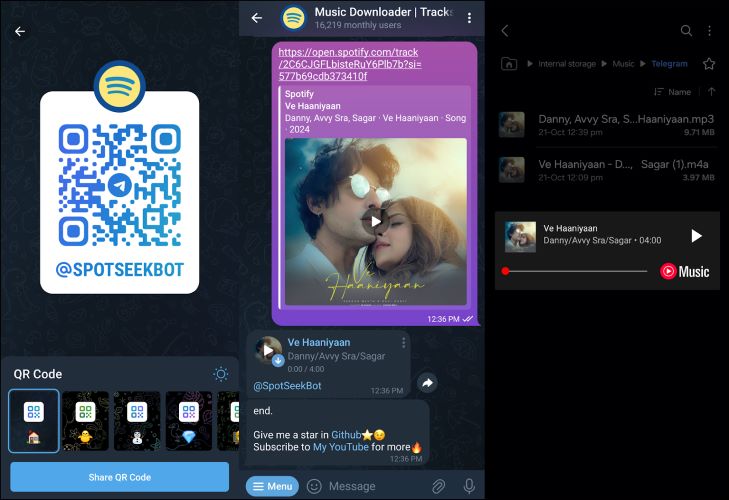
SpotSeekBot sets itself apart by supporting 320 kbps downloads. For single tracks, it’s quick and efficient: just drop in the link and the song will be yours, completed with an album art and all the details.
Like the previous bot, SpotSeekBot sources its tracks from YouTube. But here’s the real catch: you’re required to join the creator’s Telegram channel before you can download anything. If you ever leave that channel, you’ll lose the ability to download. For quick MP3 tracks? It works. But for long-term use, that extra step of channel membership can be frustrating for some users.
It’s one of the few bots that consistently provides higher bitrate MP3s. But the channel-locking feature is frustrating. — Tomas B., Community Moderator on r/Spotify
3. Music Downloader Bot (@ytsongdl_bot)
Rating: ★★★☆☆ (3.8/5)
Audio Quality: 320 kbps (MP3)
Ease of Use: ★★★★☆ – Search-based interface
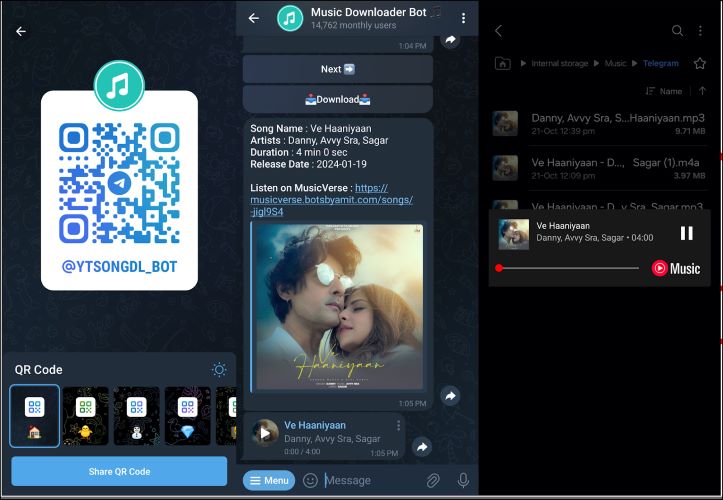
Coming from the Bots by Amit lineup, Music Downloader Bot takes a different approach: it lets you search for Spotify songs by name directly and spares you from the hassle of pasting links. However, it’s only great for finding regional tracks or songs in your native language and it really stumbles when it comes to popular classics. For instance, searching for “What a Wonderful World” brought the wrong version at first.
The good news is it will deliver 320 kbps MP3 files. The downside is you’ll need to stay in the Bots by Amit Telegram channel to keep downloading.
This bot shines in non-English music, but English results are hit-or-miss. — Rajeev N., Indian Music YouTuber
Part 3. Best Spotify Playlist Downloader Bots on Telegram
Let’s dive into the top three playlist downloader bots that can handle any Spotify playlist: personal, public, and even albums, with no hassle at all.
1. Music Downloader (@MusicsHunterBot)
Rating: ★★★★☆ (4.4/5)
Audio Quality: 320 kbps
Ease of Use: ★★★★☆ – Bulk downloads in batche
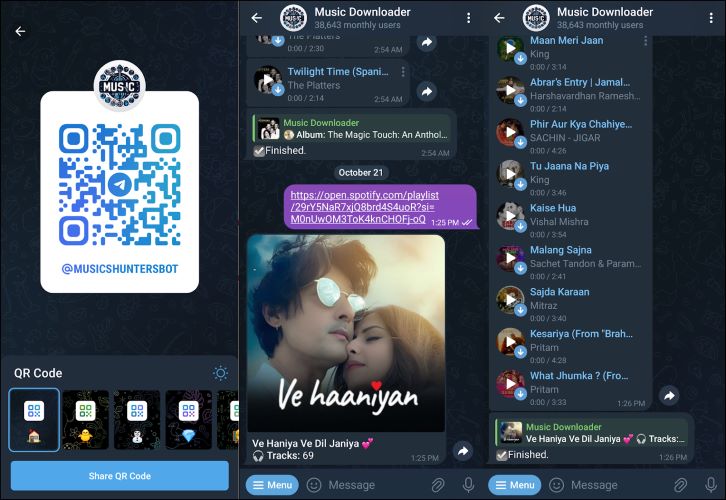
A beast when it comes to downloading playlists, MusicsHunterBot can handle 400 songs in one go. It will deliver them in 320 kbps MP3 format. Whether it’s a personal playlist, a public one, or a random list of songs, it doesn’t matter. MusicsHunterBot can process them effortlessly.
If you’re looking to batch download playlists with minimal interaction, this is the most stable Telegram bot in 2025. — Daniel M., Music Automation Expert
2. DeezLoad (@DeezLoad2Bot)
Rating: ★★★★☆ (4.0/5)
Audio Quality: 320 kbps
Ease of Use: ★★★☆☆ – Slow speed, ZIP for donors only
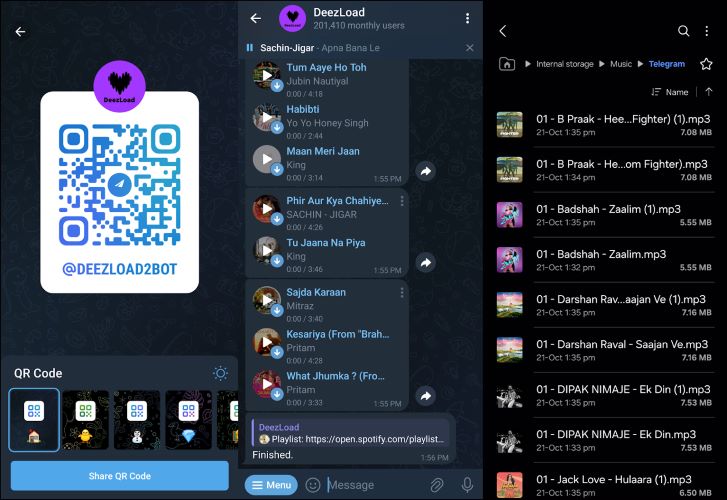
Another strong playlist downloader, DeezLoad boasts over 200,000 monthly users, giving it a solid reputation in the Telegram space. While it isn’t clear how many songs it can handle in one go, it managed a playlist of 69 tracks during testing. However, the end number doesn’t matter a lot, as the process is painfully slow. You have the option to download all songs individually, or get them in a ZIP file, but the ZIP file download is exclusive to donors.
DeezLoad is decent but not ideal for speed demons. If you’re patient, it will deliver. — Nick Soriano, TechRadar Contributor
3. Spotify Music Downloader (@spotify_music_downloader_tg_bot)
Rating: ★★★☆☆ (3.7/5)
Audio Quality: 320 kbps (MP3)
Ease of Use: ★★★★☆ – Straightforward for albums
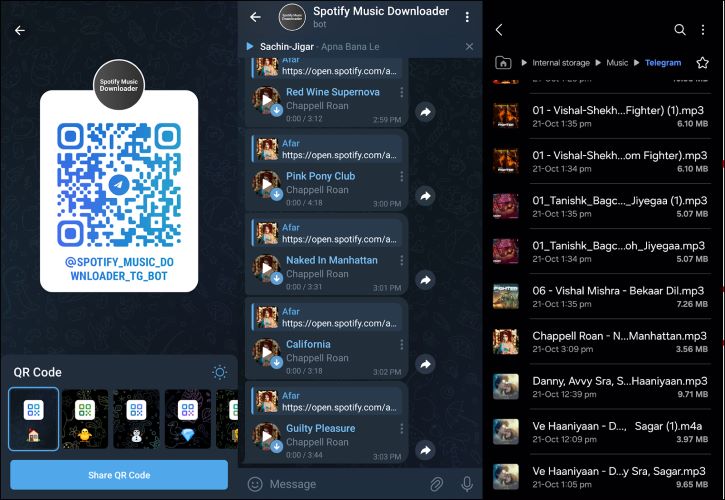
While Spotify Music Downloader doesn’t support playlists, it can fetch and download entire Spotify albums as MP3 with ease. It’s a handy option for those quick, go-to moments when you just need an album on the fly. But keep in mind that it's slower than the above two.
It’s the go-to for quick album pulls, but don’t expect much else. — Yuki N., J-Pop Digital Archive Editor
Part 4. How to Download Songs or Playlists with Spotify Downloader Telegram Bot
Whether it's a song or playlist, the basic method is the same:
- Copy Spotify link →
- Paste into bot →
- Tap download →
- Save to your device
We’ve detailed both methods with screenshots in the following article
Use a Spotify Song Downloader Bot
To download individual songs, the first step will be to grab the song name or URL from Spotify. Once you have that, submit to the Telegram bot of your choice from the list above. For this demo, let’s use SpotSeekBot. Here are the steps:
Step 1. Either scan the QR code or type @SpotSeekBot into Telegram’s search bar. Both methods work smoothly. Once you’re in, simply tap Start to activate the bot and bring it to life.
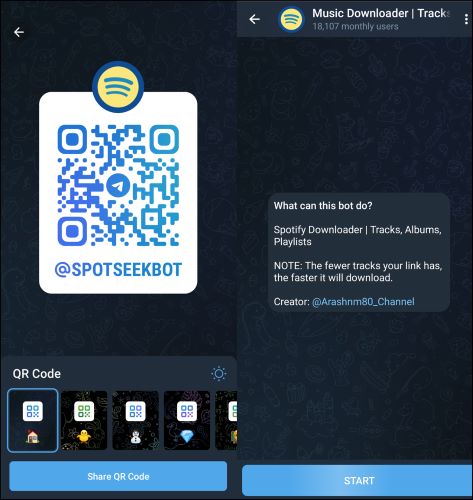
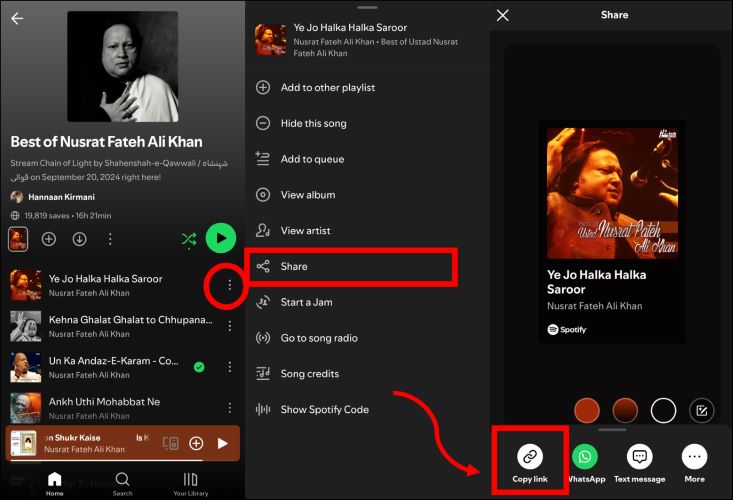
Step 2. Open Spotify and find the desired song. Tap on the three little dots sitting next to the track’s title. A menu will pop up: choose Share and from there, select Copy Link.
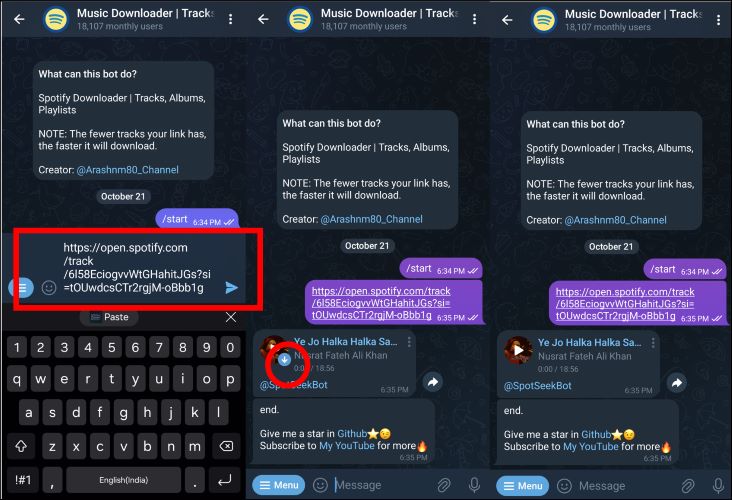
Step 3. Head over to the SpotSeekBot chat, paste the link directly into the chat box and send it to the bot. After the bot pulls up your track, you’ll see a download icon right next to the song in the chat box. Simply tap that button and your track will begin downloading instantly to your device.
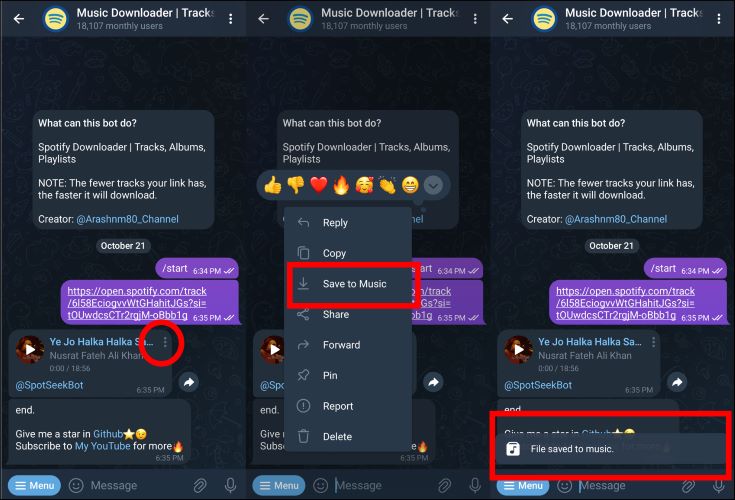
Step 4. To save the song to your device, click the three dots next to the file in the message bubble. On Android, select Save to Music, and on iOS, you’ll see the Find the Save to Files option to download Spotify music into your phone storage from Telegram’s space.
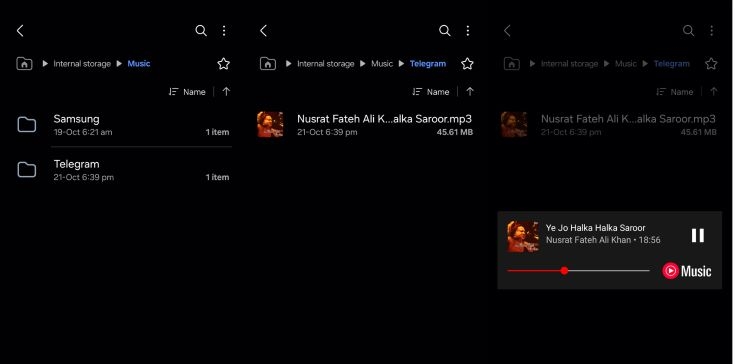
Step 5. You can locate the saved files stashed in the Telegram subfolder under Music.
Use a Spotify Playlist Downloader Bot
To download a playlist, just copy the playlist link instead of a song link from Spotify. The rest of the process stays the same. Still, here’s a quick glance into the process:
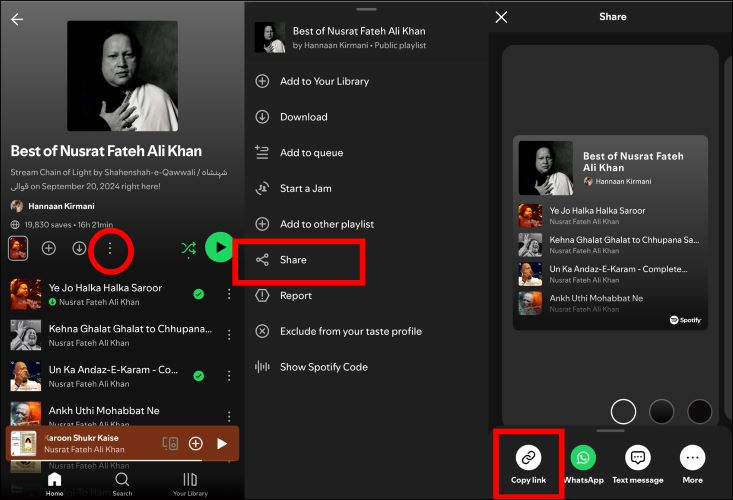
Step 1. Copying a playlist requires you to tap the three dots below the playlist banner. Then, hit Share and finally select Copy Link.
Tip: Before copying the playlist link for download, you can edit the Spotify playlist like removing unwanted songs to ensure it only includes your favorite tracks.
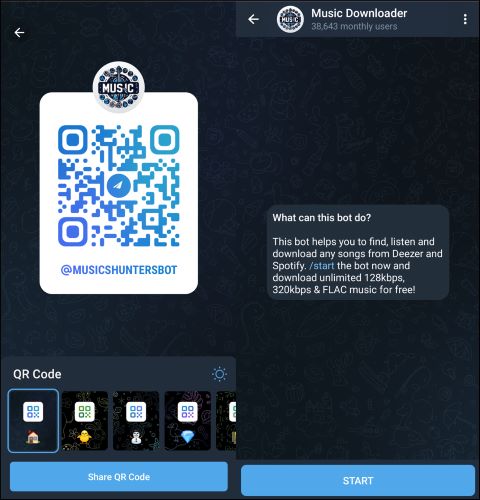
Step 2. Grab your phone, scan the QR code in the image below, or, if that’s not your thing, search for @MusicsHunterBot directly in Telegram’s search bar. A quick tap on Start will activate the bot and set you for next steps.
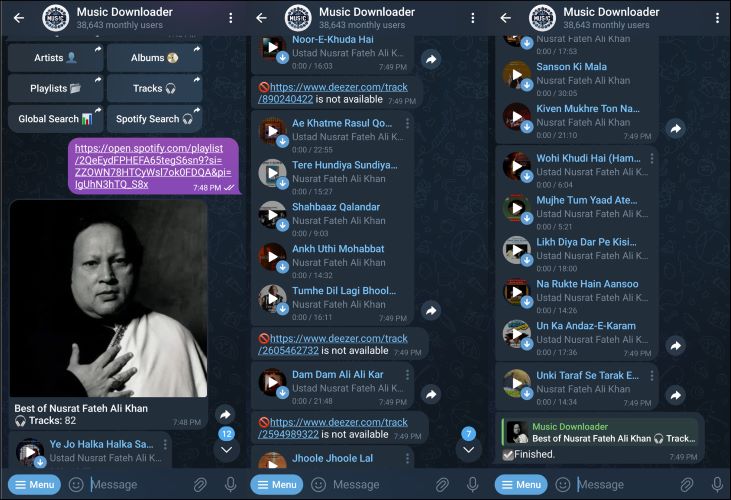
Step 3. Drop the playlist link into the bot’s input bar, and it’ll show you the total number of tracks. While most songs will start downloading, keep in mind that some tracks may be missing due to different source limitations, like Deezer in this case. But rest assured, you’ll still get the bulk of them.
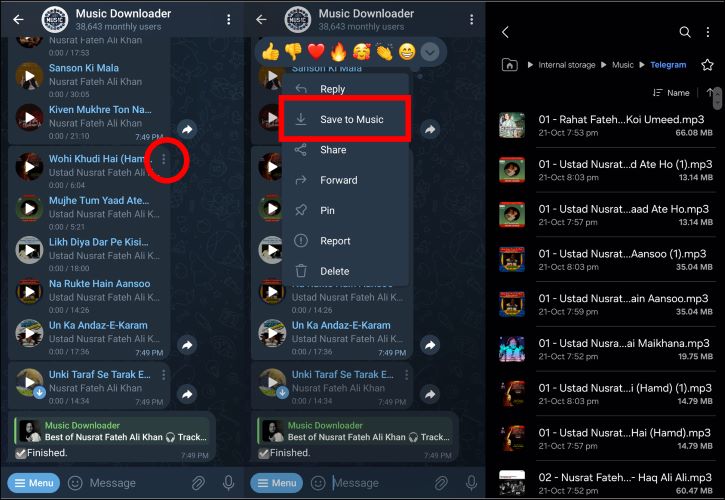
Step 4. With Musics Hunter Bot, songs arrive in bulk, usually 9 or 10 at once. After a batch pops up in the chat bubble, make sure to save the tracks first by tapping on the download icon. Once the songs are saved to Telegram, tap the three dots next to the batch and selectSave to Music.
Part 5. Best Alternative to Telegram Bots for Downloading Spotify Music
Unlike Telegram bots that rely on third-party platforms like YouTube or Deezer—often resulting in poor audio quality, mismatches, or missing songs—Eassiy Screen Recorder Ultimate offers a fully optimized, professional-grade solution for capturing any audio you stream online, with no restrictions or missing tracks.
- Capture any audio playing on your device in real time
- No DRM or platform restrictions—if you can hear it, you can record it
- Save recordings in high-quality formats like MP3, AAC, and more
Eassiy Screen Recorder Ultimate is engineered to support audio capture from any streaming source. It solves the core limitations of Telegram bots by letting you record exactly what you hear, with zero playlist gaps or missing metadata concerns.
Even better, there's no need to copy and paste song links manually. Simply play your content, hit record, and the software handles the rest—with an intuitive interface that requires no technical skills.
Rating: ★★★★★ (4.9/5)
Ease of Use: ★★★★☆ – Very intuitive interface, no tech skills required
Audio Quality: ★★★★★ – High-quality output up to lossless formats
Key Features:
- Record any audio stream playing on your device with system sound capture
- Supports multiple output formats including MP3, AAC, and more
- Set recording duration with a built-in timer for hands-free operation
- Preview recordings before saving to ensure quality
- Works on both Windows and Mac
Here's how to record streaming audio using Eassiy Screen Recorder Ultimate:
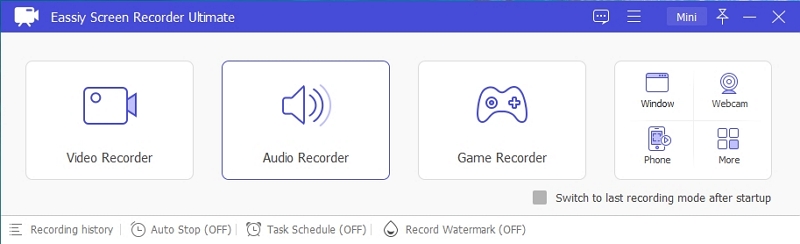
Step 1. Launch the program and select the Audio Recorder feature from the home screen.
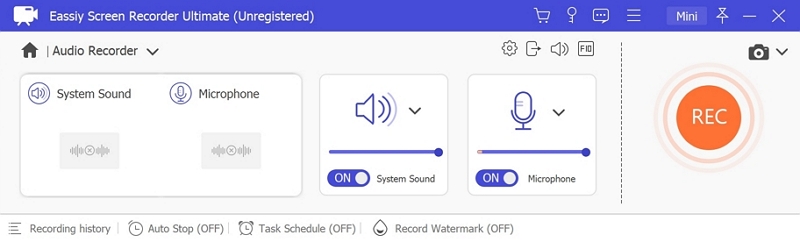
Step 2. Configure your audio recording settings. Enable System Sound to capture the live stream audio. Optionally enable the microphone if needed.
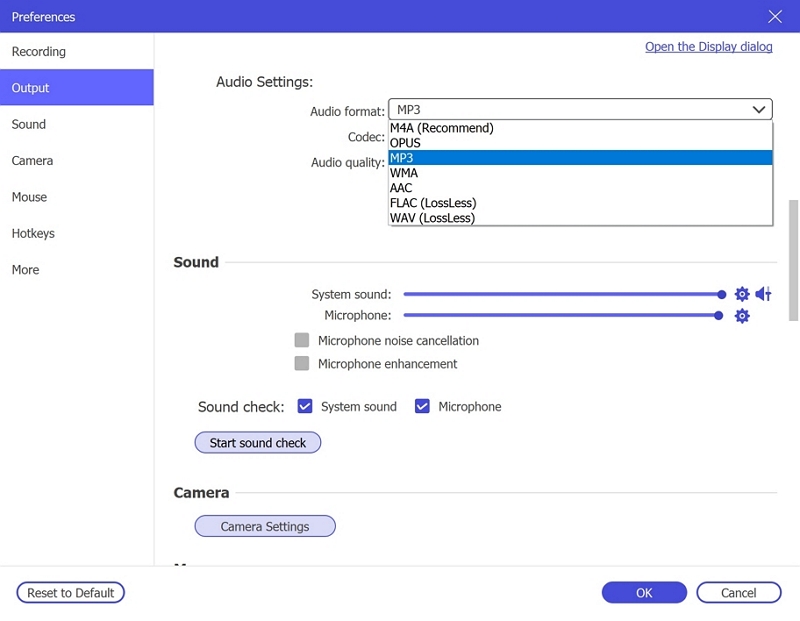
Click Settings → Preferences → Output to select your desired audio format (e.g., MP3, AAC) and set the quality to High for the best results. Click OK to save.
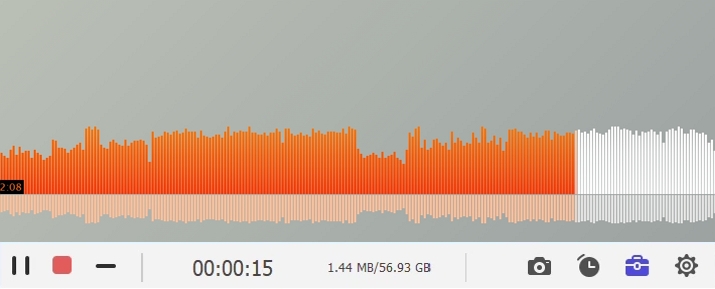
Step 3. Play the audio or music stream you wish to record, then click REC to begin recording. Use the toolbar to adjust volume, pause, or stop at any time. To automate the process, click the clock icon to set a recording duration in advance.
Step 4. When finished, click stop and preview your recording. Save it in your preferred format (MP3, AAC, etc.) to your device for offline listening anytime.
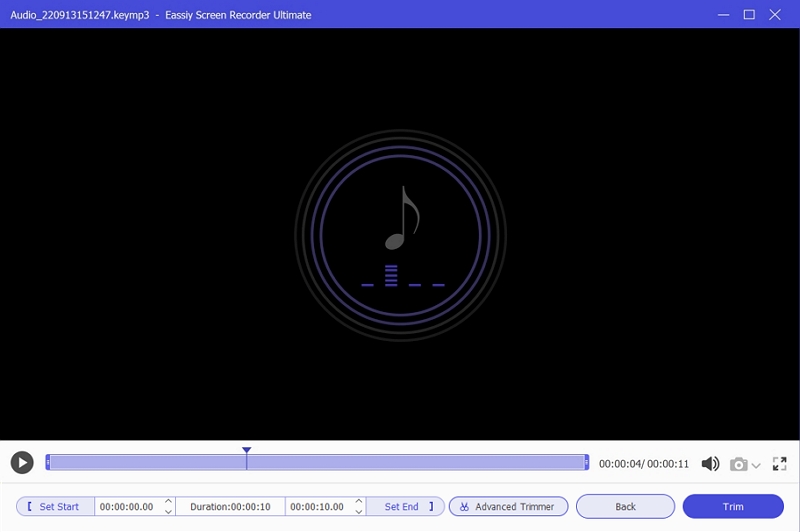
Expert Verdict: "Eassiy Screen Recorder Ultimate is by far the most flexible solution for capturing streaming audio. It works regardless of platform restrictions, retains audio quality, and the interface is clean enough for any user."
Bonus: If you want a more direct way to save Spotify music as local files, StreamFox for Music is also a great alternative to a Telegram downloader bot. You can install it on your desktop, log in to your Spotify account, and then select the music you want to download, including individual tracks, albums, and playlists. The downloaded songs are available in MP3, FLAC, and other common formats, with audio quality up to 320 kbps, and ID3 tags are also preserved.
Bonus: Top 2 Spotify Downloader Telegram Bots to Download Spotify Music in 320kbps
Telegram bots are created easily, but keeping them running is another story. Even the best ones often vanish quickly due to Telegram’s strict control and frequent removals. So, it is always wise to have a few extra options in hand. While the six above should have you covered for some time, we’ve included two more options that support 320 kbps downloads. So, let’s take a quick look at what they offer and especially how they compare to the ones we’ve already explored.
1. DeezDown (@DeezerMusicBot)
Rating: ★★★★☆ (4.1/5)
Audio Quality: 320 kbps
Extras: Works with SoundCloud, includes metadata
Note: Admin updates bot links when old versions are banned
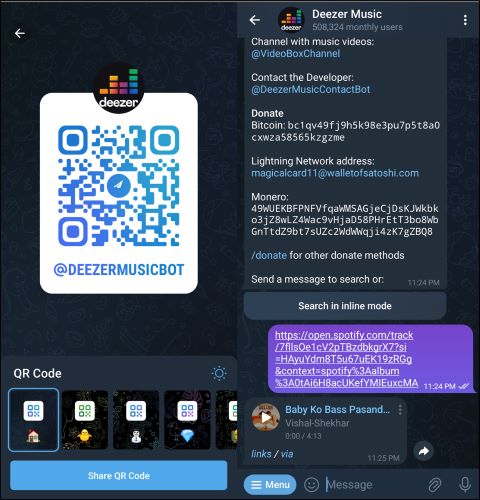
DeezDown is a versatile option that lets you download music from not just Spotify and Deezer, but also SoundCloud. It even includes a link to a special request-based channel for downloading video tracks in 480p. However, focusing solely on the music features, Deezer Music Bot delivers sound at 320 kbps. And like most bots preserves album details, cover art, and metadata. Its large user base really sets it apart and is also an indicator that it has withstood the test of time. And even if the bot becomes unavailable, the admin often provides links to a new version, ensuring you will never be left without an option.
It’s versatile and well-maintained, which is rare in Telegram bots. — Arjun Nair, Bot Developer
2. Spotify Music Downloader (@Spotify_downloa2_bot)
Rating: ★★★★☆ (4.2/5)
Audio Quality: FLAC 1674 kbps (Lossless)
Drawbacks: Premium required, 40 song download limit, unstable bot links
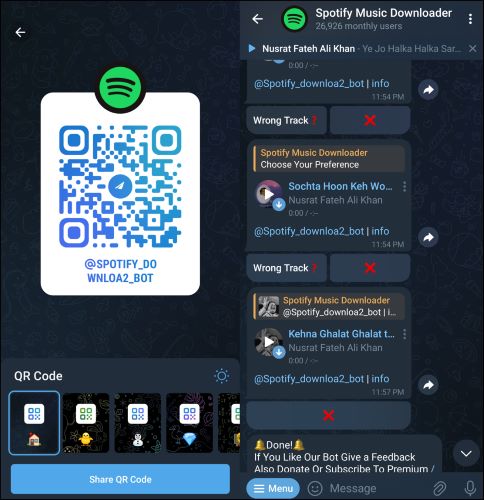
The best of Spotify downloaders on Telegram. If you’re after the highest possible audio quality: a flat 1674 kbps FLAC lossless format, this is your go-to bot. For reference, a 5-minute song will be around 60 MB, so if you’re serious about quality and have the storage space to handle it, this downloader has got you covered. Besides converting Spotify to FLAC, it can also download songs in WAV, MP3, etc.
Be that as it may, there are many downsides attached to it too. Spotify Music Downloader will only download songs that are in its database. Plus, you have to buy the US$ 10/mo premium to download more than 40 songs in a single go. Additionally, it frequently disappears and resurfaces under new names every month or so, so you’ll need to keep track of it via its community on Telegram.
A great tool for audiophiles—if you don’t mind chasing the latest version every other week. — Maria Klein, Sound Engineer
Conclusion
Telegram bots are handy, but they’re built by developers for promotions. They’re not purpose-built for music and many will end up redirecting you to other channels instead of delivering a seamless music experience.
That’s where Eassiy Screen Recorder Ultimate steps in. It’s dedicatedly built for Spotify and allows you to save music in pristine, lossless quality: no fuzz, no missing songs, just pure audio bliss. If you’re serious about quality, consistency, and having control over your music library, then Eassiy Screen Recorder Ultimate is a good option.